RPGUI
CSS + JS kit for old-school RPG web-game interfaces: framed containers, golden/wooden borders, sliders, progress bars, 8-bit cursors, checkboxes, dropdowns and RPG icons, all from plain HTML with rpgui classes.
Summary
CSS + JS kit for old-school RPG web-game interfaces: framed containers, golden/wooden borders, sliders, progress bars, 8-bit cursors, checkboxes, dropdowns and RPG icons, all from plain HTML with rpgui classes.
What it is
A CSS-only (or CSS + small JS) component kit that restyles plain HTML into a themed UI.
Who it’s for
Developers who want a game or retro look without drawing assets.
Key takeaways
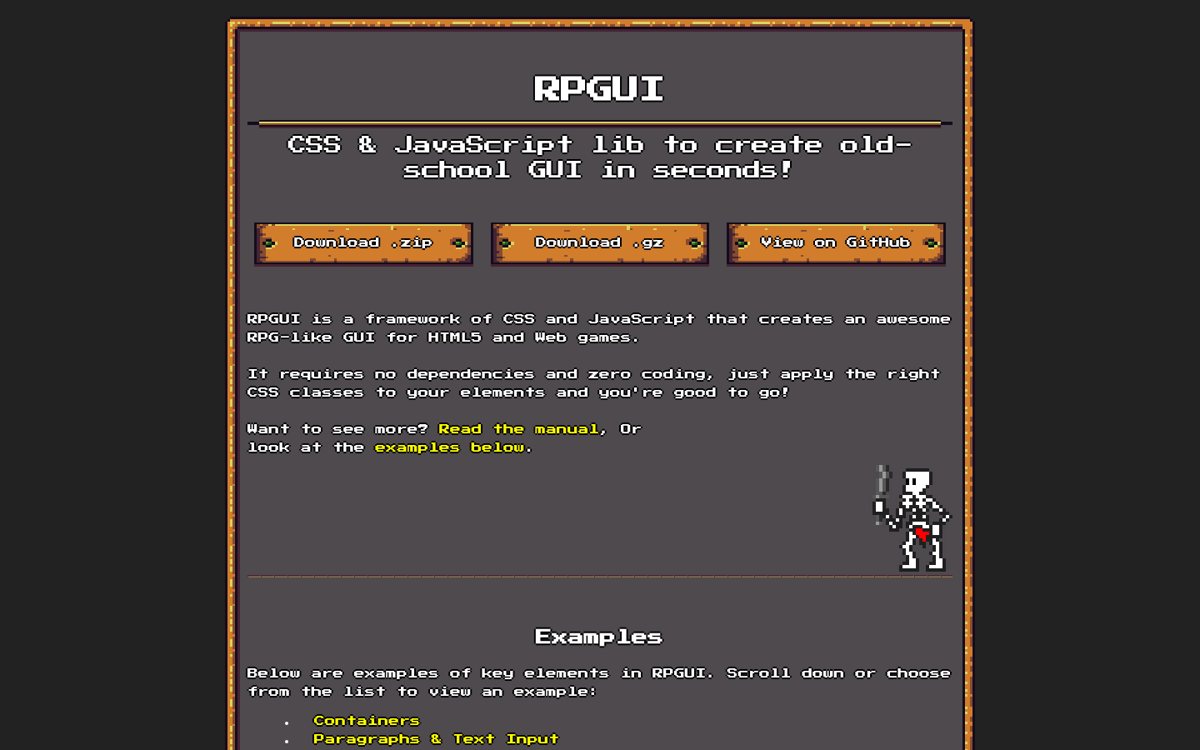
- Our capture of the RPGUI demo: a dark page with a carved-wood framed panel, golden dividers, outlined white text and a custom pixel cursor, followed by example widgets.
- It looks like an in-game menu, not a website.
- Strength: complete RPG chrome (frames, bars, cursors, icons) with plain HTML classes.
- Risk: about 1.35 MB of images (README), dated pixel assets, and the README notes blurry scaling on old Edge, so test image-rendering on your targets.
Best practices to borrow
- Put everything inside .rpgui-content; RPGUI styles paragraphs, headers and form elements automatically inside it (OFFICIAL, https://github.com/RonenNess/RPGUI).
- Budget for ~1.35 MB of images on first load and preload them behind a loading screen (OFFICIAL figure from the README; advice OURS).
- Set image-rendering:pixelated on scaled frames and test on every browser you support; the README notes blurry magnification on old Edge (OFFICIAL).
- Keep the README credit for the Buch artwork in your credits file as a courtesy, even though it is public domain (OURS).
- Use a near-black canvas, white text and at most one accent.
- Use a left nav tree, a readable center column and an on-page table of contents.
- Pin the version, load one theme only, and use the retro font for display text, not paragraphs.
Deep dive
A structured read of each source’s official README, licence file, package metadata or about page, fetched on 2026-10-24 (UTC+8). OFFICIAL = stated on the cited page or file; ESTIMATED = measured by us (CSS sizes, class and colour counts, contrast); OURS = our interpretation, not legal advice.
What it is
OURS- A plain-HTML kit for fantasy RPG menus in browser games.
- For web-game developers and jam teams who need menus fast.
Source: ronenness.github.io/RPGUI/
Licence and credits
OFFICIAL- ‘RPGUI is distributed under the zlib-license, and is absolutely free for use in any purpose (personal, educational, commercial, etc..)’.
- Default theme ‘uses the public-domain graphics made by Buch, aka Michele Bucelli’ (README Credits). LICENSE.txt contains the zlib text.
Source: github.com/RonenNess/RPGUI
Features and weight
OFFICIAL- No coding: CSS classes; containers with several frame types, dragging, sliders, progress bars, 8-bit cursors, RPG icons, checkboxes, radios, dropdown and listbox based on <select>.
- ‘Very lightweight - just 25kb of css/js, + 1.35Mb of resources (images)’. Tested on Chrome, Firefox, Opera and Edge.
Source: github.com/RonenNess/RPGUI
Pitfalls and lessons
OURS- The project shows its age (README screenshot is ‘slightly outdated’); expect to restyle sizes for modern screens.
- Images are the weight: lazy-load or sprite them if the menu is not the first screen.
Source: ronenness.github.io/RPGUI/
Palette preview
Quick links
Usage terms at a glance
Our plain-language summary of the license recorded above, as of 2026-10-24. Not legal advice: always read the source’s own terms before shipping.
- Commercial use
- Yes (zlib: ‘any purpose’)
- Attribution
- Not required; don’t misrepresent authorship or remove the notice from source
- Redistribution
- Yes; altered versions must be marked as altered (zlib)
- How you get it
- GitHub download (dist folder)
How to use
<link href="rpgui.css" rel="stylesheet"><script src="rpgui.js"></script>
<div class="rpgui-content"><div class="rpgui-container framed">
  <p>Welcome, traveller.</p><button class="rpgui-button"><p>Start</p></button></div></div>
# files: github.com/RonenNess/RPGUI (dist folder); ~25 KB css/js + ~1.35 MB images (README)
Reference capture
What the source looked like when we analysed it. A fair-use page capture taken by this library; the site, its artwork and marks belong to their owner, and no asset files are redistributed here.
Dominant palette from our captures
Measured by us from our screenshot(s) of https://ronenness.github.io/RPGUI/ (median-cut quantization; share = % of pixels). Approximate and not official.
Layout pattern: Documentation
Observed by us on the captured page(s). See all entries by layout.
How to apply it: Use a left nav tree, a readable center column and an on-page table of contents.
Other entries with this layout: Apple Human Interface Guidelines, Spotify brand & design guidelines, Vercel brand assets (Geist), DiceBear · Lorelei, DiceBear · Notionists (Notion-style avatars), Anthropic ‘frontend-design’ skill, NES.css, 98.css + XP.css, Pixel fonts: Press Start 2P, Pixelify Sans, Silkscreen, VT323.
Components
Observed on the captured pages.
- Framed containers (wooden, golden, grey)
- Buttons
- Sliders
- Progress bars (health/mana)
- Checkboxes and radios
- Dropdown and listbox
- Dragging
- RPG icons
- Custom cursors
Our analysis
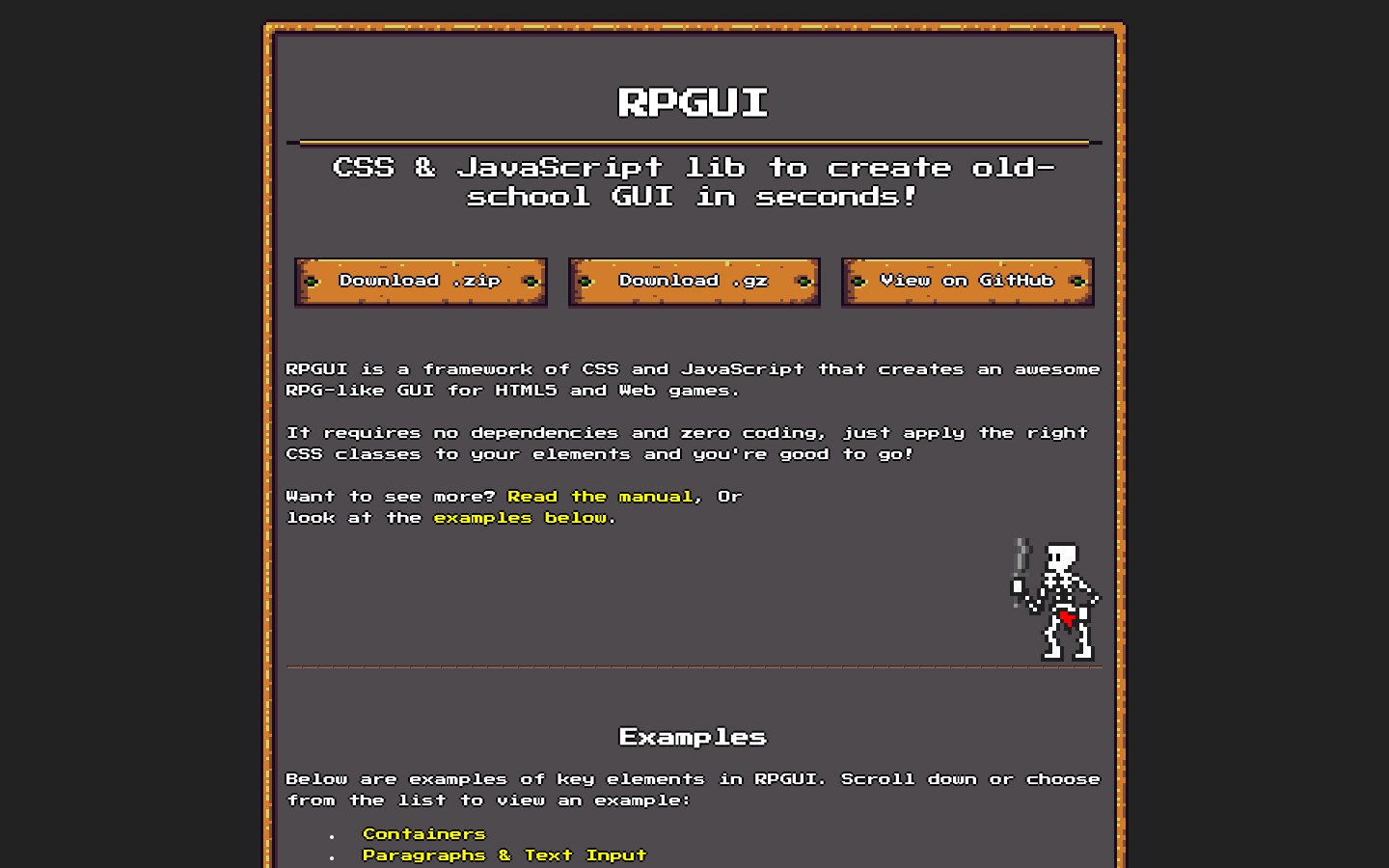
Our capture of the RPGUI demo: a dark page with a carved-wood framed panel, golden dividers, outlined white text and a custom pixel cursor, followed by example widgets. It looks like an in-game menu, not a website. Strength: complete RPG chrome (frames, bars, cursors, icons) with plain HTML classes. Risk: about 1.35 MB of images (README), dated pixel assets, and the README notes blurry scaling on old Edge, so test image-rendering on your targets.
Similar to this
Ranked by shared color theme, layout, category, type and mood tags.
Downloads
PDF: research notes made for this library; third-party images inside follow the credits in their captions. License / terms of the source: zlib licence (‘free for use in any purpose’); default-theme graphics are public domain by Buch (Michele Bucelli), per the README credits
DESIGN.md for AI coding agents
Copy this into your repo or agent context. OFFICIAL and ESTIMATED values are labelled.
# DESIGN.md · RPGUI (GP-003)

> Written for AI coding agents. Values marked **OFFICIAL** come from the documented source named below; values marked **ESTIMATED** were measured by us from our own screenshots and are approximate. Never treat ESTIMATED values as official brand tokens.

## Overview
- Type: CSS Framework · Category: K. Gaming and Pixel Art
- Platforms: Web
- Color theme: Monochrome dark · Layout pattern: Documentation · Mood: Fantasy, handcrafted, game-like
- License / terms: zlib licence (‘free for use in any purpose’); default-theme graphics are public domain by Buch (Michele Bucelli), per the README credits

CSS + JS kit for old-school RPG web-game interfaces: framed containers, golden/wooden borders, sliders, progress bars, 8-bit cursors, checkboxes, dropdowns and RPG icons, all from plain HTML with rpgui classes.

### Analysis (ours)
Our capture of the RPGUI demo: a dark page with a carved-wood framed panel, golden dividers, outlined white text and a custom pixel cursor, followed by example widgets. It looks like an in-game menu, not a website. Strength: complete RPG chrome (frames, bars, cursors, icons) with plain HTML classes. Risk: about 1.35 MB of images (README), dated pixel assets, and the README notes blurry scaling on old Edge, so test image-rendering on your targets.

### Best practices (ours)
- Put everything inside .rpgui-content; RPGUI styles paragraphs, headers and form elements automatically inside it (OFFICIAL, https://github.com/RonenNess/RPGUI).
- Budget for ~1.35 MB of images on first load and preload them behind a loading screen (OFFICIAL figure from the README; advice OURS).
- Set image-rendering:pixelated on scaled frames and test on every browser you support; the README notes blurry magnification on old Edge (OFFICIAL).
- Keep the README credit for the Buch artwork in your credits file as a courtesy, even though it is public domain (OURS).

### Deep analysis
Values marked OFFICIAL come from the cited official page, README, licence file or package metadata, fetched 2026-10-24 (UTC+8). ESTIMATED values were measured by us that day (CSS file sizes from unpkg, class and colour counts, contrast ratios). OURS is our interpretation, not legal advice.

#### What it is (OURS) · source: https://ronenness.github.io/RPGUI/
- A plain-HTML kit for fantasy RPG menus in browser games.
- For web-game developers and jam teams who need menus fast.

#### Licence and credits (OFFICIAL) · source: https://github.com/RonenNess/RPGUI
- ‘RPGUI is distributed under the zlib-license, and is absolutely free for use in any purpose (personal, educational, commercial, etc..)’.
- Default theme ‘uses the public-domain graphics made by Buch, aka Michele Bucelli’ (README Credits). LICENSE.txt contains the zlib text.

#### Features and weight (OFFICIAL) · source: https://github.com/RonenNess/RPGUI
- No coding: CSS classes; containers with several frame types, dragging, sliders, progress bars, 8-bit cursors, RPG icons, checkboxes, radios, dropdown and listbox based on <select>.
- ‘Very lightweight - just 25kb of css/js, + 1.35Mb of resources (images)’. Tested on Chrome, Firefox, Opera and Edge.

#### Pitfalls and lessons (OURS) · source: https://ronenness.github.io/RPGUI/
- The project shows its age (README screenshot is ‘slightly outdated’); expect to restyle sizes for modern screens.
- Images are the weight: lazy-load or sprite them if the menu is not the first screen.

### Usage terms at a glance (our summary, not legal advice)
- Commercial use: Yes (zlib: ‘any purpose’)
- Attribution: Not required; don’t misrepresent authorship or remove the notice from source
- Redistribution: Yes; altered versions must be marked as altered (zlib)
- How you get it: GitHub download (dist folder)

## Color tokens
No official color tokens documented for this entry.

ESTIMATED · dominant colors measured from our screenshot(s) of the source site (median-cut quantization; share = % of pixels). Approximate, not official:

- `#222222` ~37%
- `#4F4A4E` ~37%
- `#87725B` ~8%

## Typography
No official type scale documented for this entry; use the product’s own typography guidance.

## Spacing, radii, shadows
Not documented for this entry. Do not invent values; derive from your own design system.

## Components
- Framed containers (wooden, golden, grey)
- Buttons
- Sliders
- Progress bars (health/mana)
- Checkboxes and radios
- Dropdown and listbox
- Dragging
- RPG icons
- Custom cursors

## Layout rules
- Observed layout pattern: **Documentation** (from our captures).

## Usage
```
<link href="rpgui.css" rel="stylesheet"><script src="rpgui.js"></script>
<div class="rpgui-content"><div class="rpgui-container framed">
  <p>Welcome, traveller.</p><button class="rpgui-button"><p>Start</p></button></div></div>
# files: github.com/RonenNess/RPGUI (dist folder); ~25 KB css/js + ~1.35 MB images (README)
```

## Do’s and don’ts
- Do: Use a near-black canvas with high-contrast white text and at most one accent.
- Don’t: Don’t add multiple saturated accents or light-mode shadows.
- Do: follow the source’s license/terms listed above.
- Don’t: present ESTIMATED colors as official tokens.

## Sources
- https://ronenness.github.io/RPGUI/
- Library entry: https://design-library-byt.pages.dev/entry/GP-003