98.css + XP.css
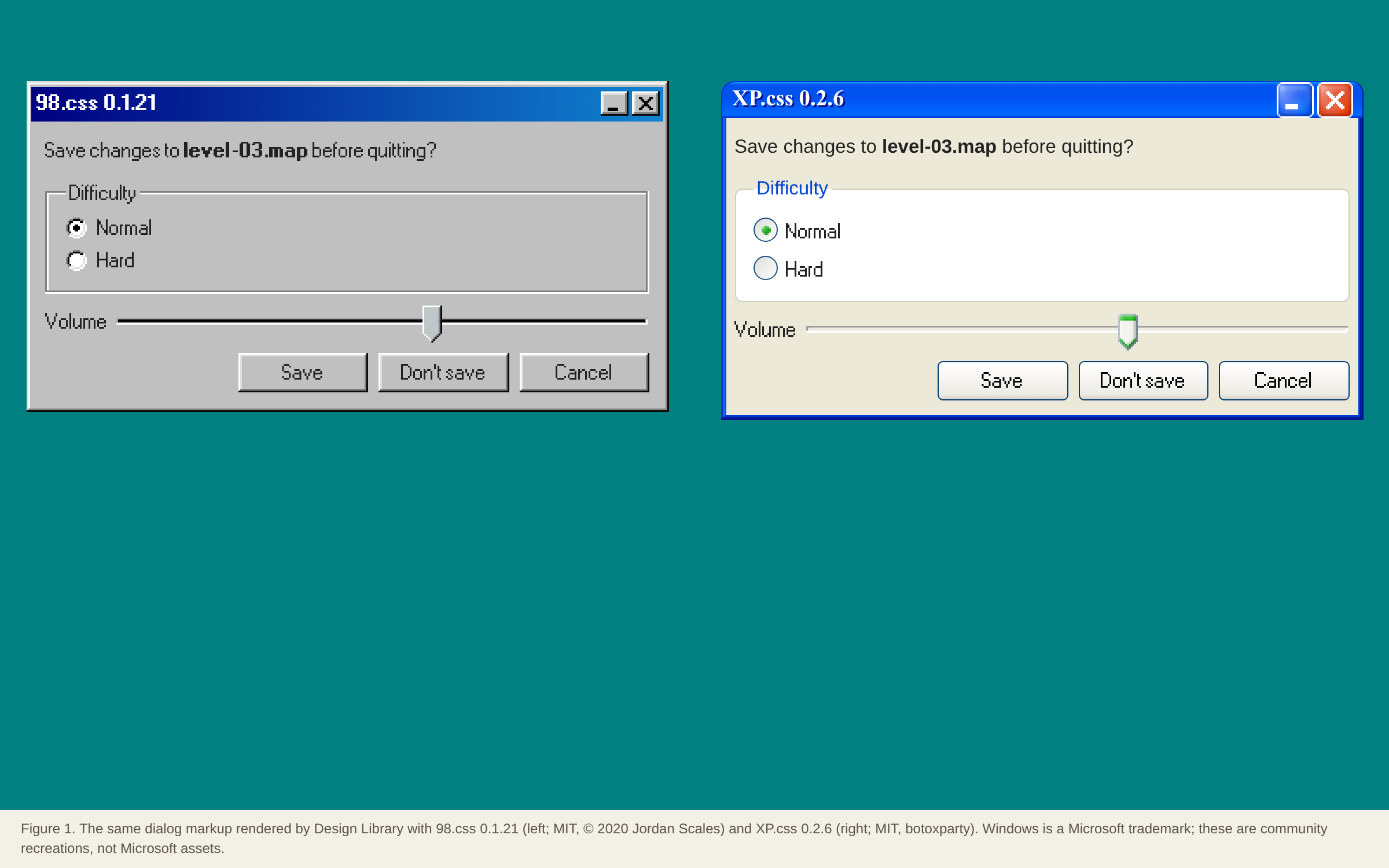
Two sibling CSS files that turn semantic HTML into faithful Windows 98 and Windows XP dialogs, title bars, fieldsets, sliders and tree views. No JavaScript, so they work with any framework.
Summary
Two sibling CSS files that turn semantic HTML into faithful Windows 98 and Windows XP dialogs, title bars, fieldsets, sliders and tree views. No JavaScript, so they work with any framework.
What it is
A CSS-only (or CSS + small JS) component kit that restyles plain HTML into a themed UI.
Who it’s for
Developers who want a game or retro look without drawing assets.
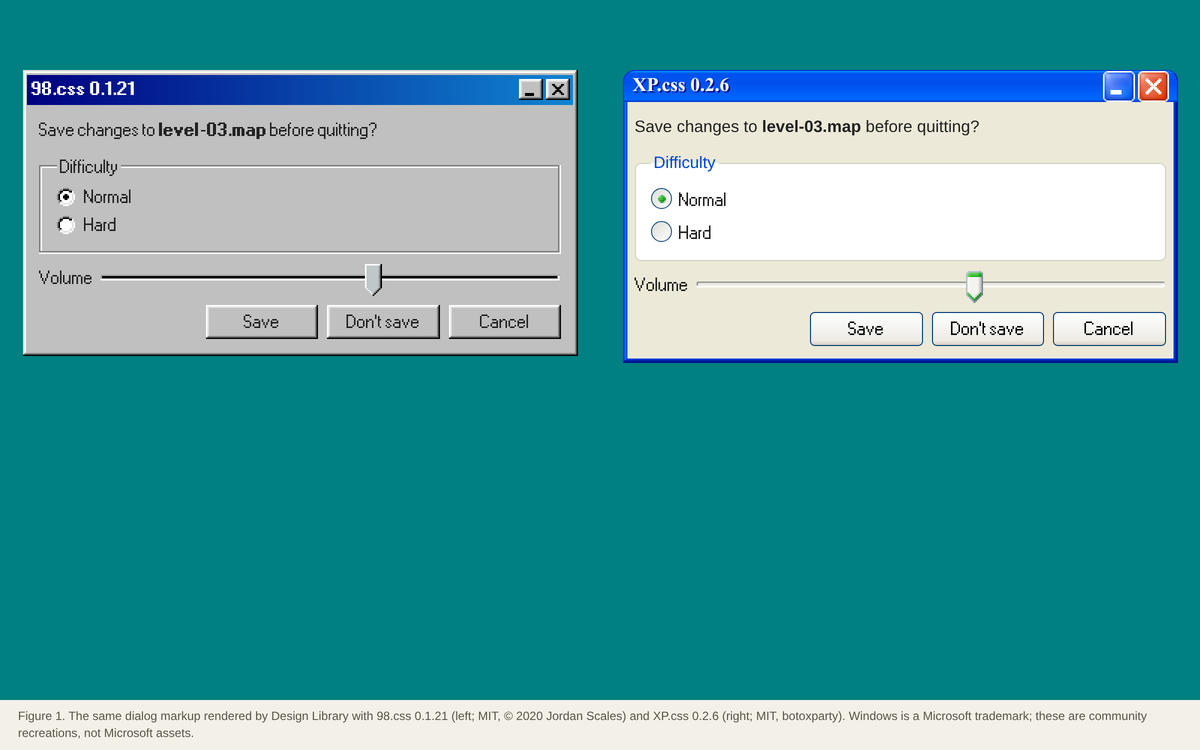
Key takeaways
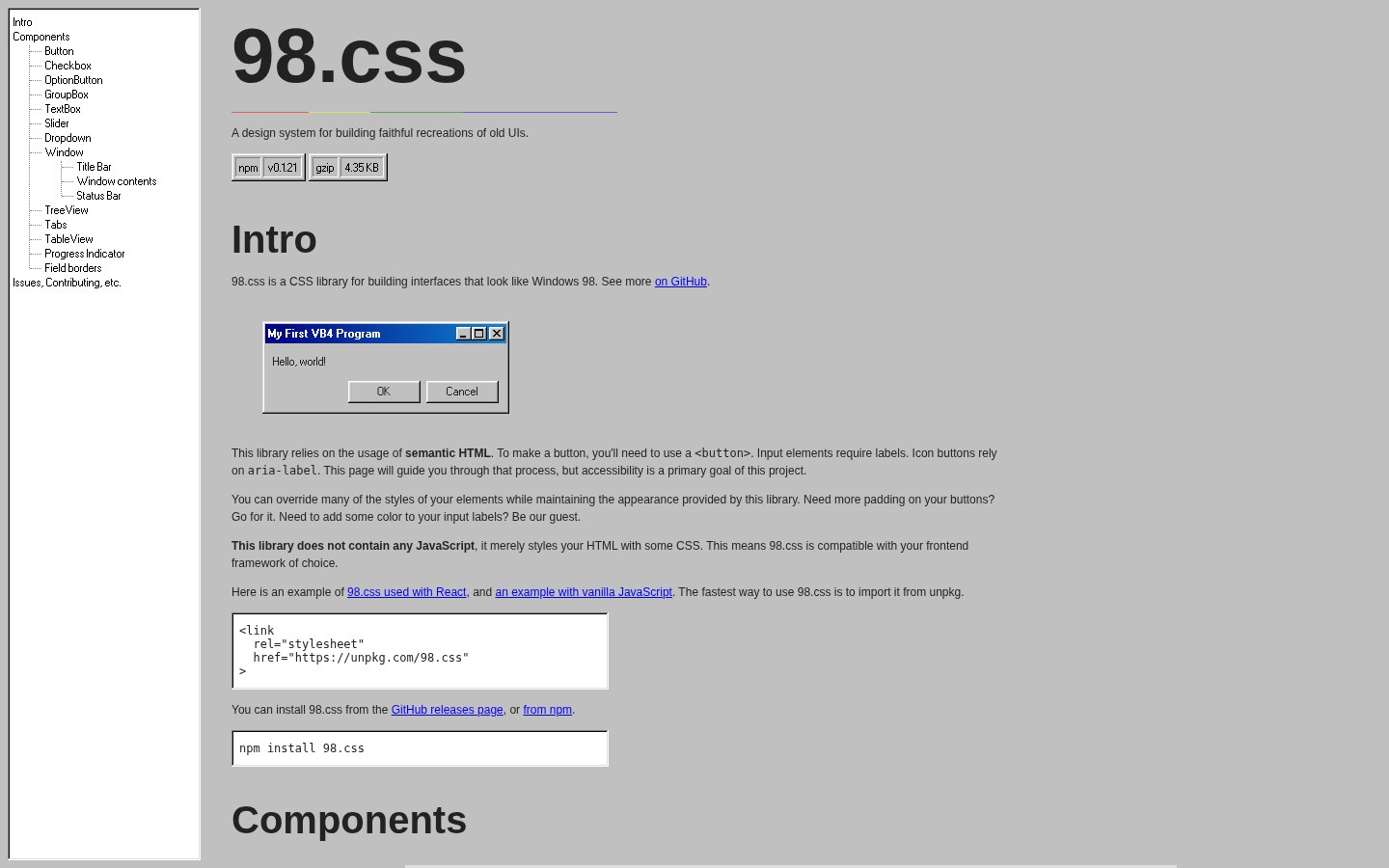
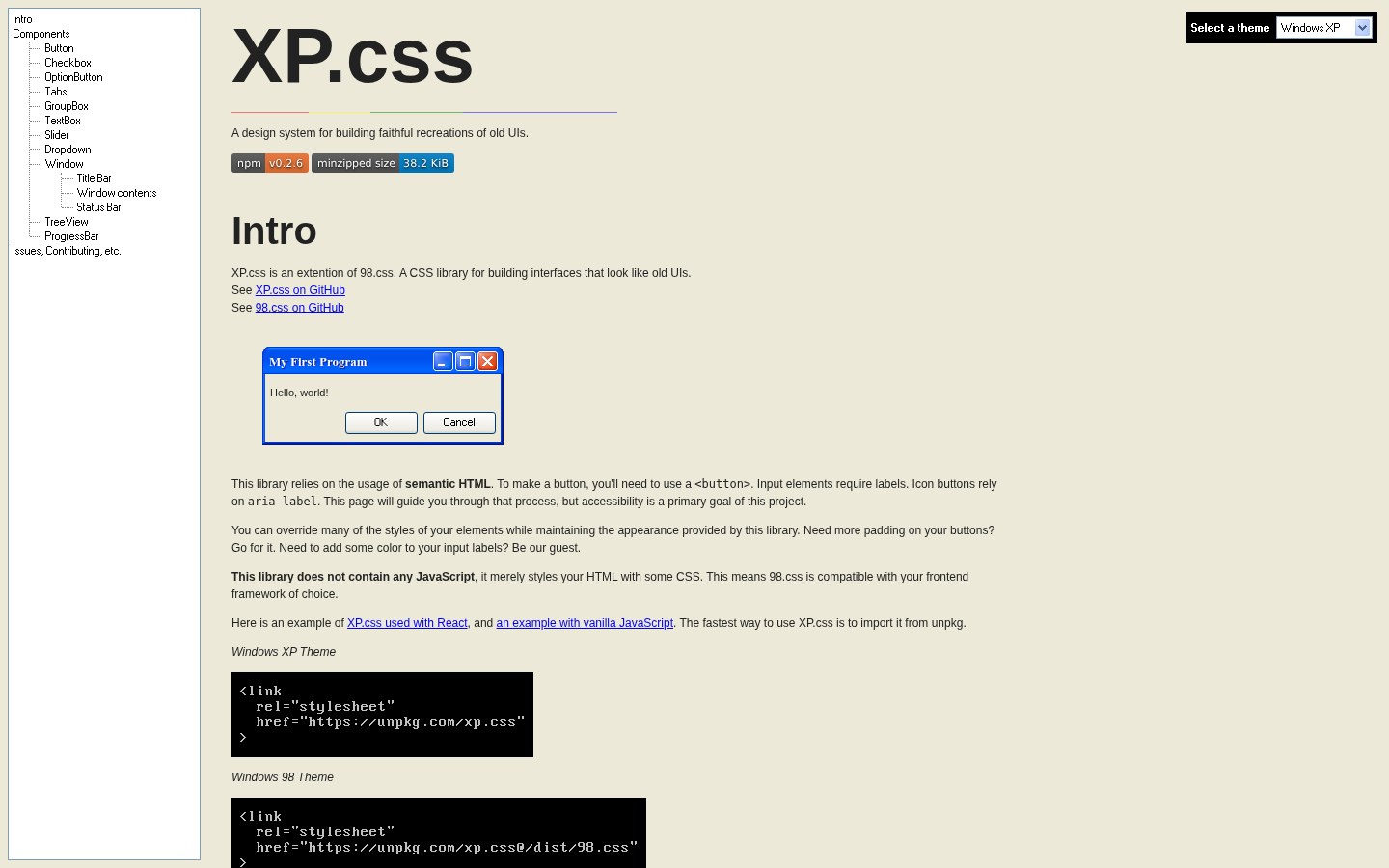
- Our captures of the 98.css and XP.css docs: a narrow left table of contents and a long single column where every component is shown live above its HTML.
- The components carry all the colour (teal-free gray bevels for 98, blue title bars and soft greens for XP), the page itself stays plain.
- Strength: it styles semantic HTML (fieldset, button, input type=range) so markup stays accessible.
- Risk: the retro look reads as a joke unless the product really is about nostalgia, and bevelled 11 px UI is small for touch.
Best practices to borrow
- Use real semantic elements (fieldset, legend, button, input type=range); the CSS styles them directly, which keeps keyboard and screen-reader support (OFFICIAL concept, https://github.com/jdan/98.css).
- Load only one theme at a time: XP.css says to ‘include only one theme at a time’ (OFFICIAL, https://github.com/botoxparty/XP.css).
- 98.css is tiny: about 27 KB raw / 4.5 KB gzip, while XP.css is about 256 KB / 38 KB because it inlines more assets (ESTIMATED, our download).
- Scale the window up (CSS zoom or larger font) for touch screens; the original 11 px controls are below comfortable tap size (OURS).
- Keep chrome neutral and let content carry color.
- Use a left nav tree, a readable center column and an on-page table of contents.
- Pin the version, load one theme only, and use the retro font for display text, not paragraphs.
Deep dive
A structured read of each source’s official README, licence file, package metadata or about page, fetched on 2026-10-24 (UTC+8). OFFICIAL = stated on the cited page or file; ESTIMATED = measured by us (CSS sizes, class and colour counts, contrast); OURS = our interpretation, not legal advice.
What it is
OURS- 98.css and its extension XP.css restyle plain HTML into Windows 98 or XP controls.
- For nostalgia projects, ‘desktop’ portfolios and teaching old UI patterns.
Source: jdan.github.io/98.css/
Licence and packages
OFFICIAL- 98.css: MIT, © 2020 Jordan Scales; npm 98.css 0.1.21. ‘It does not ship with any JavaScript’.
- XP.css: MIT, npm xp.css 0.2.6, ‘an extension of 98.css’; includes a 98 theme; ‘include only one theme at a time’ (https://github.com/botoxparty/XP.css).
Source: github.com/jdan/98.css
Measured
ESTIMATED- 98.css dist: 26,848 bytes raw / 4,459 gzip. XP.css dist: 256,202 raw / 38,003 gzip (our downloads).
- Both demo pages are long single-column docs with a left table of contents (our captures).
Source: jdan.github.io/98.css/
Pitfalls and lessons
OURS- Don’t use the Windows logo or imply Microsoft endorsement; the CSS recreates a look, the brand is not included.
- Bevel-heavy 11 px controls need scaling on phones; test tap targets.
Source: botoxparty.github.io/XP.css/
Palette preview
Quick links
Usage terms at a glance
Our plain-language summary of the license recorded above, as of 2026-10-24. Not legal advice: always read the source’s own terms before shipping.
- Commercial use
- Yes (MIT)
- Attribution
- Keep the MIT notice
- Redistribution
- Yes, with the licence notice
- How you get it
- npm or unpkg CDN
How to use
npm install 98.css   # or: npm install xp.css
<link rel="stylesheet" href="https://unpkg.com/98.css">
<div class="window"><div class="title-bar"><div class="title-bar-text">My First Program</div></div>
  <div class="window-body"><p>Hello, world!</p></div></div>
Reference capture
What the source looked like when we analysed it. A fair-use page capture taken by this library; the site, its artwork and marks belong to their owner, and no asset files are redistributed here.
Figures
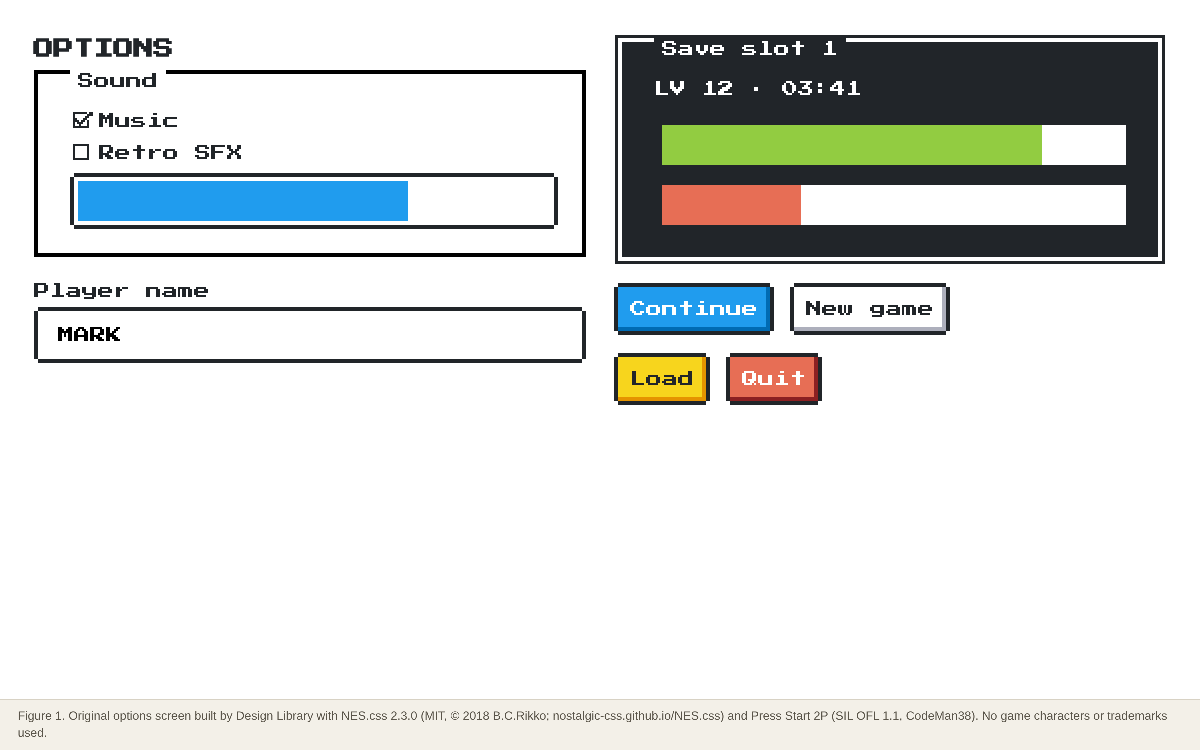
Original figures made by Design Library from open-licensed files (MIT, OFL, CC0) or public palette values; each caption names the files and licences.
Dominant palette from our captures
Measured by us from our screenshot(s) of https://jdan.github.io/98.css/ (median-cut quantization; share = % of pixels). Approximate and not official.
Layout pattern: Documentation
Observed by us on the captured page(s). See all entries by layout.
How to apply it: Use a left nav tree, a readable center column and an on-page table of contents.
Other entries with this layout: Apple Human Interface Guidelines, Spotify brand & design guidelines, Vercel brand assets (Geist), DiceBear · Lorelei, DiceBear · Notionists (Notion-style avatars), Anthropic ‘frontend-design’ skill, NES.css, RPGUI, Pixel fonts: Press Start 2P, Pixelify Sans, Silkscreen, VT323.
Components
Observed on the captured pages.
- Window, title bar and controls
- Buttons
- Checkboxes and option buttons
- Group boxes (fieldset)
- Text boxes
- Sliders
- Dropdowns
- Tabs
- Tree view
- Progress indicator (XP)
Our analysis
Our captures of the 98.css and XP.css docs: a narrow left table of contents and a long single column where every component is shown live above its HTML. The components carry all the colour (teal-free gray bevels for 98, blue title bars and soft greens for XP), the page itself stays plain. Strength: it styles semantic HTML (fieldset, button, input type=range) so markup stays accessible. Risk: the retro look reads as a joke unless the product really is about nostalgia, and bevelled 11 px UI is small for touch.
Similar to this
Ranked by shared color theme, layout, category, type and mood tags.
Downloads
PDF: research notes made for this library; third-party images inside follow the credits in their captions. License / terms of the source: MIT (98.css © 2020 Jordan Scales; XP.css by botoxparty, MIT). The Windows look is Microsoft’s trade dress; these are community recreations
DESIGN.md for AI coding agents
Copy this into your repo or agent context. OFFICIAL and ESTIMATED values are labelled.
# DESIGN.md · 98.css + XP.css (GP-002)

> Written for AI coding agents. Values marked **OFFICIAL** come from the documented source named below; values marked **ESTIMATED** were measured by us from our own screenshots and are approximate. Never treat ESTIMATED values as official brand tokens.

## Overview
- Type: CSS Framework · Category: K. Gaming and Pixel Art
- Platforms: Web
- Color theme: Monochrome light · Layout pattern: Documentation · Mood: Nostalgic, utilitarian
- License / terms: MIT (98.css © 2020 Jordan Scales; XP.css by botoxparty, MIT). The Windows look is Microsoft’s trade dress; these are community recreations

Two sibling CSS files that turn semantic HTML into faithful Windows 98 and Windows XP dialogs, title bars, fieldsets, sliders and tree views. No JavaScript, so they work with any framework.

### Analysis (ours)
Our captures of the 98.css and XP.css docs: a narrow left table of contents and a long single column where every component is shown live above its HTML. The components carry all the colour (teal-free gray bevels for 98, blue title bars and soft greens for XP), the page itself stays plain. Strength: it styles semantic HTML (fieldset, button, input type=range) so markup stays accessible. Risk: the retro look reads as a joke unless the product really is about nostalgia, and bevelled 11 px UI is small for touch.

### Best practices (ours)
- Use real semantic elements (fieldset, legend, button, input type=range); the CSS styles them directly, which keeps keyboard and screen-reader support (OFFICIAL concept, https://github.com/jdan/98.css).
- Load only one theme at a time: XP.css says to ‘include only one theme at a time’ (OFFICIAL, https://github.com/botoxparty/XP.css).
- 98.css is tiny: about 27 KB raw / 4.5 KB gzip, while XP.css is about 256 KB / 38 KB because it inlines more assets (ESTIMATED, our download).
- Scale the window up (CSS zoom or larger font) for touch screens; the original 11 px controls are below comfortable tap size (OURS).

### Deep analysis
Values marked OFFICIAL come from the cited official page, README, licence file or package metadata, fetched 2026-10-24 (UTC+8). ESTIMATED values were measured by us that day (CSS file sizes from unpkg, class and colour counts, contrast ratios). OURS is our interpretation, not legal advice.

#### What it is (OURS) · source: https://jdan.github.io/98.css/
- 98.css and its extension XP.css restyle plain HTML into Windows 98 or XP controls.
- For nostalgia projects, ‘desktop’ portfolios and teaching old UI patterns.

#### Licence and packages (OFFICIAL) · source: https://github.com/jdan/98.css
- 98.css: MIT, © 2020 Jordan Scales; npm 98.css 0.1.21. ‘It does not ship with any JavaScript’.
- XP.css: MIT, npm xp.css 0.2.6, ‘an extension of 98.css’; includes a 98 theme; ‘include only one theme at a time’ (https://github.com/botoxparty/XP.css).

#### Measured (ESTIMATED) · source: https://jdan.github.io/98.css/
- 98.css dist: 26,848 bytes raw / 4,459 gzip. XP.css dist: 256,202 raw / 38,003 gzip (our downloads).
- Both demo pages are long single-column docs with a left table of contents (our captures).

#### Pitfalls and lessons (OURS) · source: https://botoxparty.github.io/XP.css/
- Don’t use the Windows logo or imply Microsoft endorsement; the CSS recreates a look, the brand is not included.
- Bevel-heavy 11 px controls need scaling on phones; test tap targets.

### Usage terms at a glance (our summary, not legal advice)
- Commercial use: Yes (MIT)
- Attribution: Keep the MIT notice
- Redistribution: Yes, with the licence notice
- How you get it: npm or unpkg CDN

## Color tokens
No official color tokens documented for this entry.

ESTIMATED · dominant colors measured from our screenshot(s) of the source site (median-cut quantization; share = % of pixels). Approximate, not official:

- `#C0C0C0` ~35%
- `#ECE9D8` ~33%
- `#FBFBF8` ~14%
- `#74777D` ~6%

## Typography
No official type scale documented for this entry; use the product’s own typography guidance.

## Spacing, radii, shadows
Not documented for this entry. Do not invent values; derive from your own design system.

## Components
- Window, title bar and controls
- Buttons
- Checkboxes and option buttons
- Group boxes (fieldset)
- Text boxes
- Sliders
- Dropdowns
- Tabs
- Tree view
- Progress indicator (XP)

## Layout rules
- Observed layout pattern: **Documentation** (from our captures).

## Usage
```
npm install 98.css   # or: npm install xp.css
<link rel="stylesheet" href="https://unpkg.com/98.css">
<div class="window"><div class="title-bar"><div class="title-bar-text">My First Program</div></div>
  <div class="window-body"><p>Hello, world!</p></div></div>
```

## Do’s and don’ts
- Do: Keep chrome neutral and let content (images, icons, type) carry color.
- Don’t: Don’t introduce decorative color that competes with content.
- Do: follow the source’s license/terms listed above.
- Don’t: present ESTIMATED colors as official tokens.

## Sources
- https://jdan.github.io/98.css/
- Library entry: https://design-library-byt.pages.dev/entry/GP-002