WR-001 · I. Website References

Linear

Dark, monochrome marketing site led by large product UI renders; tiered pricing table; sign-up page with a minimal centered auth card.

Summary

Dark, monochrome marketing site led by large product UI renders; tiered pricing table; sign-up page with a minimal centered auth card.

What it is

A well-designed public website, captured by us (hero, key pages and a public flow) as a reference.

Who it’s for

Designers and front-end developers studying landing pages, pricing pages and sign-up entry points.
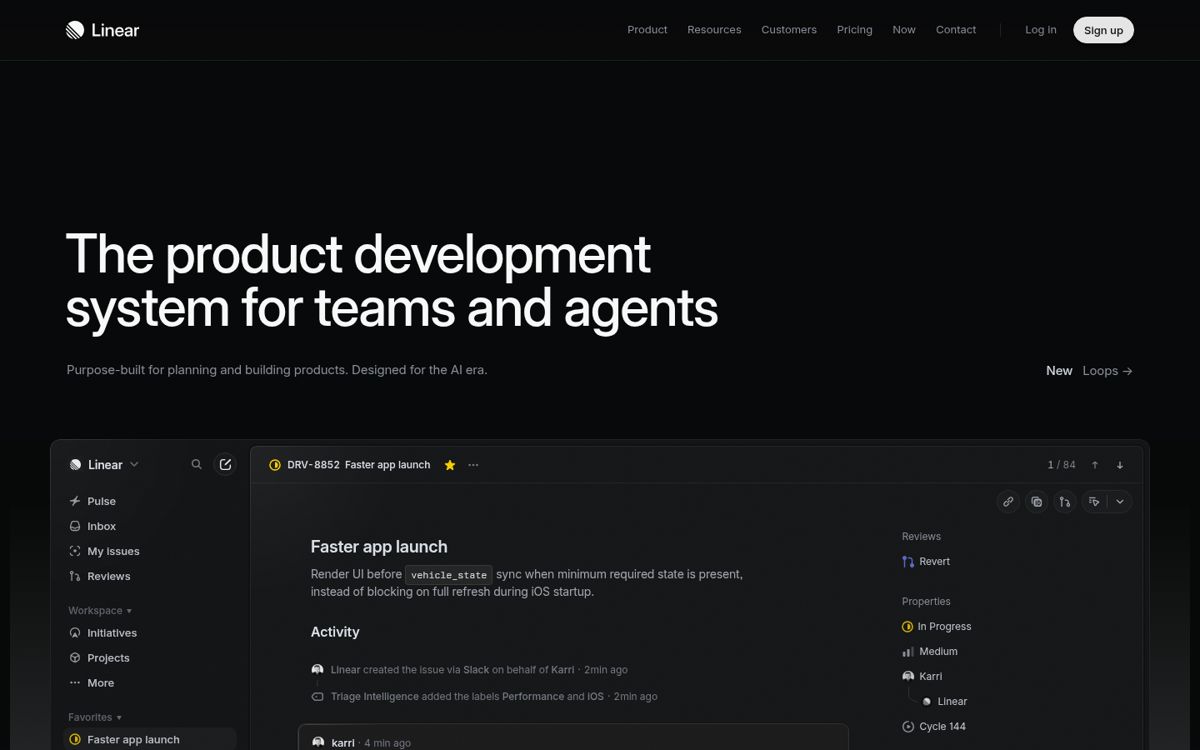
Monochrome darkSplit heroPrecise, engineering-minimalSaaS
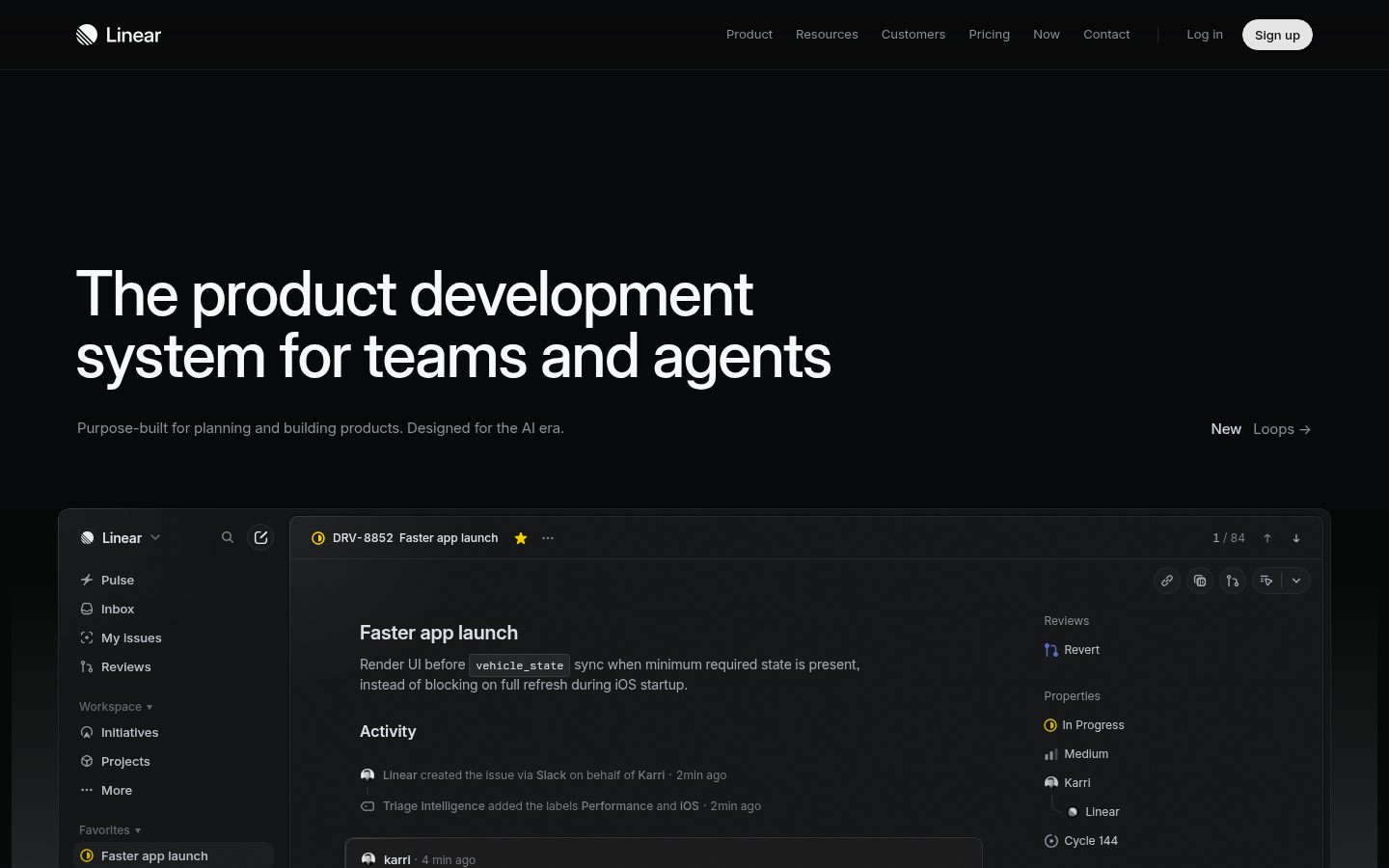
Linear: hero image
Step 1 · Landing: https://linear.app/. Captured 2026-10-22 23:13 (UTC+8) with a headless browser at 1440×900 by this library. Fair-use reference capture; content and marks © Linear, all rights reserved.

Key takeaways

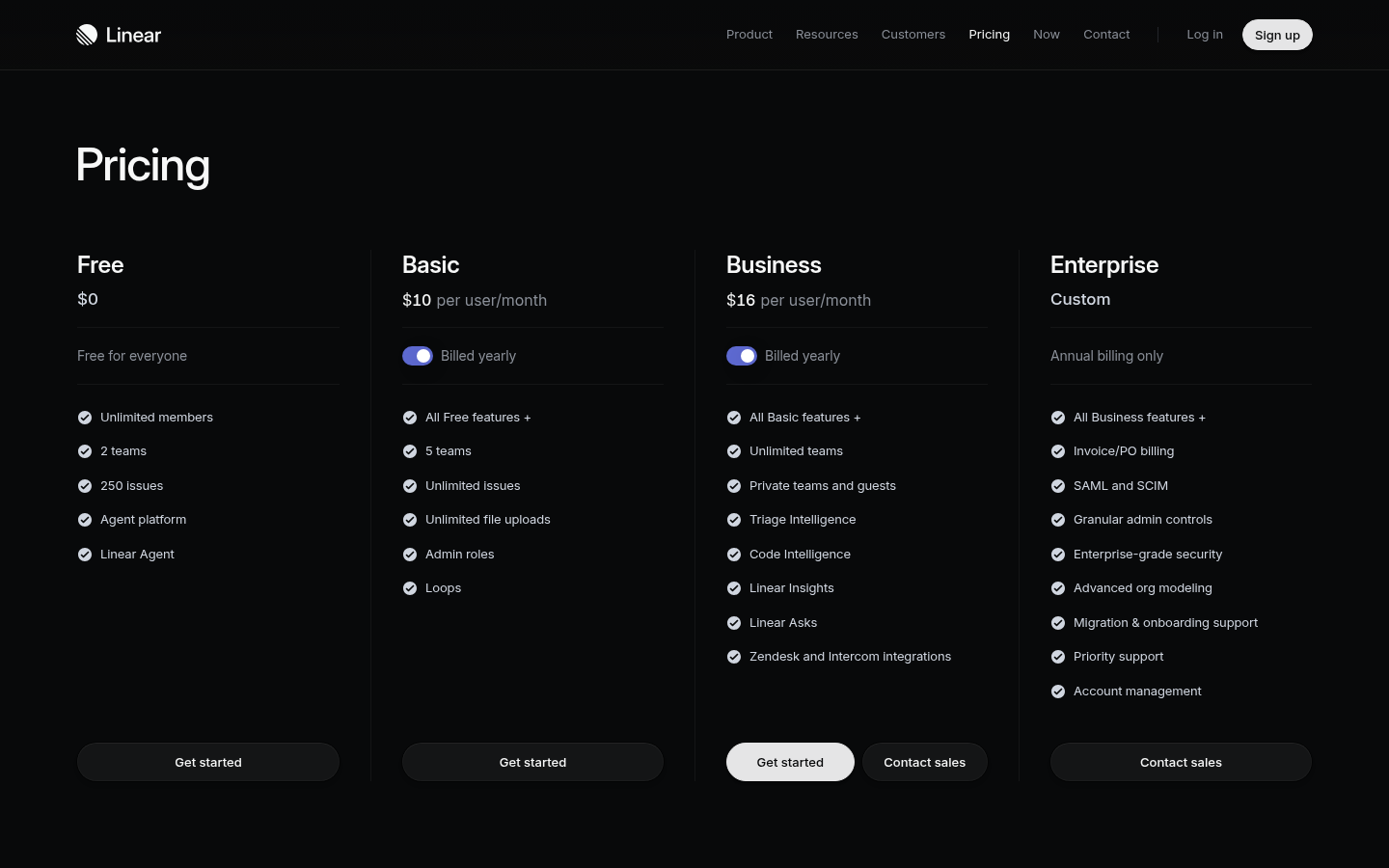
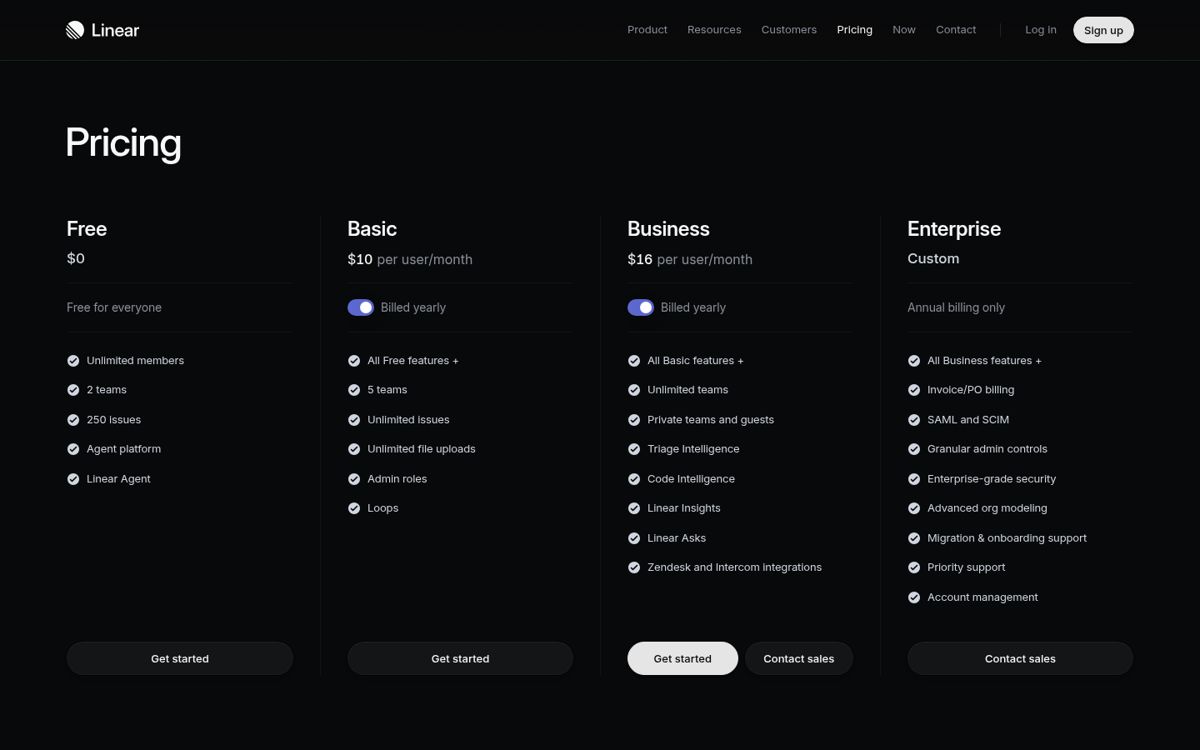
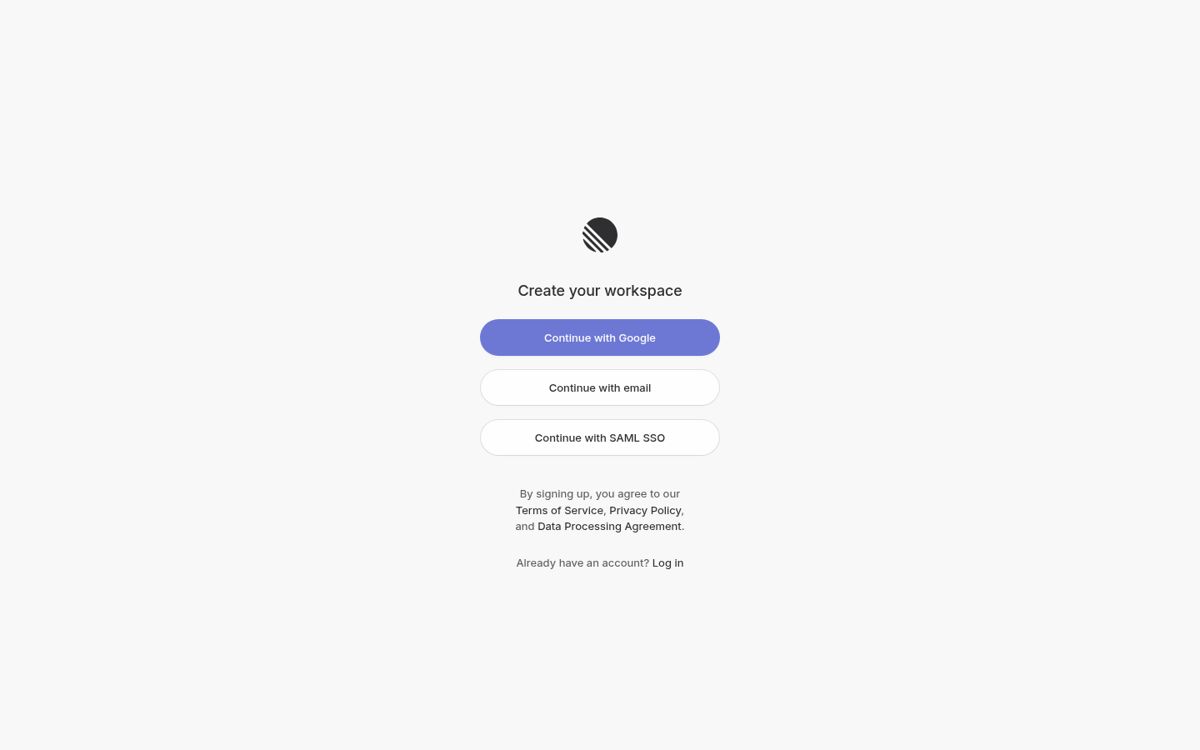
  • Captured linear.app: near-black canvas (#08090A ESTIMATED), large white headline and a product-UI render as the hero visual; pricing is a dark four-column table; sign-up is a small centered card.
  • Accent color is almost absent.
  • Color: monochrome dark theme; dominant colors #08090A, #F8F8F9, #303135 (ESTIMATED from our capture).

Best practices to borrow

  • Use a near-black canvas, white text and at most one accent.
  • Put the promise on one side and proof (product, media or illustration) on the other; keep the headline short.
  • Borrow structure and hierarchy, not brand assets; check contrast on any accent you take.
ESTIMATED

Palette preview

#08090A~42%#F8F8F9~32%#303135~4%

Screenshots and the step-by-step flow are in the Flow tab and the Inside the product tab.
ESTIMATED

Dominant palette from our captures

Measured by us from our screenshot(s) of https://linear.app (median-cut quantization; share = % of pixels). Approximate and not official.

#08090A~42% of pixels#F8F8F9~32% of pixels#303135~4% of pixels

Layout pattern: Split hero

Observed by us on the captured page(s). See all entries by layout.

How to apply it: Put the promise on one side and proof (product, media or illustration) on the other; keep the headline short.

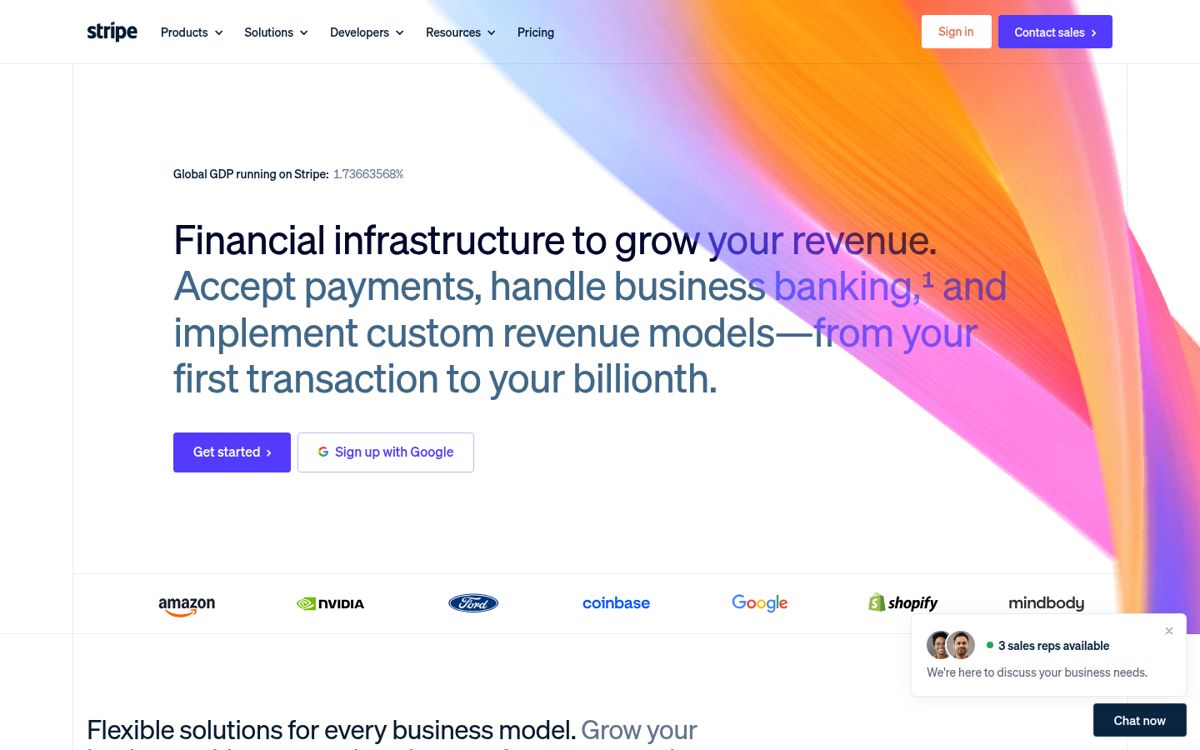
Other entries with this layout: Material Design 3, Heroicons, Phosphor Icons, Stripe, Notion, DiceBear, Open Peeps, Humaaans, Blush, Linear onboarding flow.

Components

Observed on the captured pages.

  • Top nav with CTA
  • Product UI render
  • Pricing table
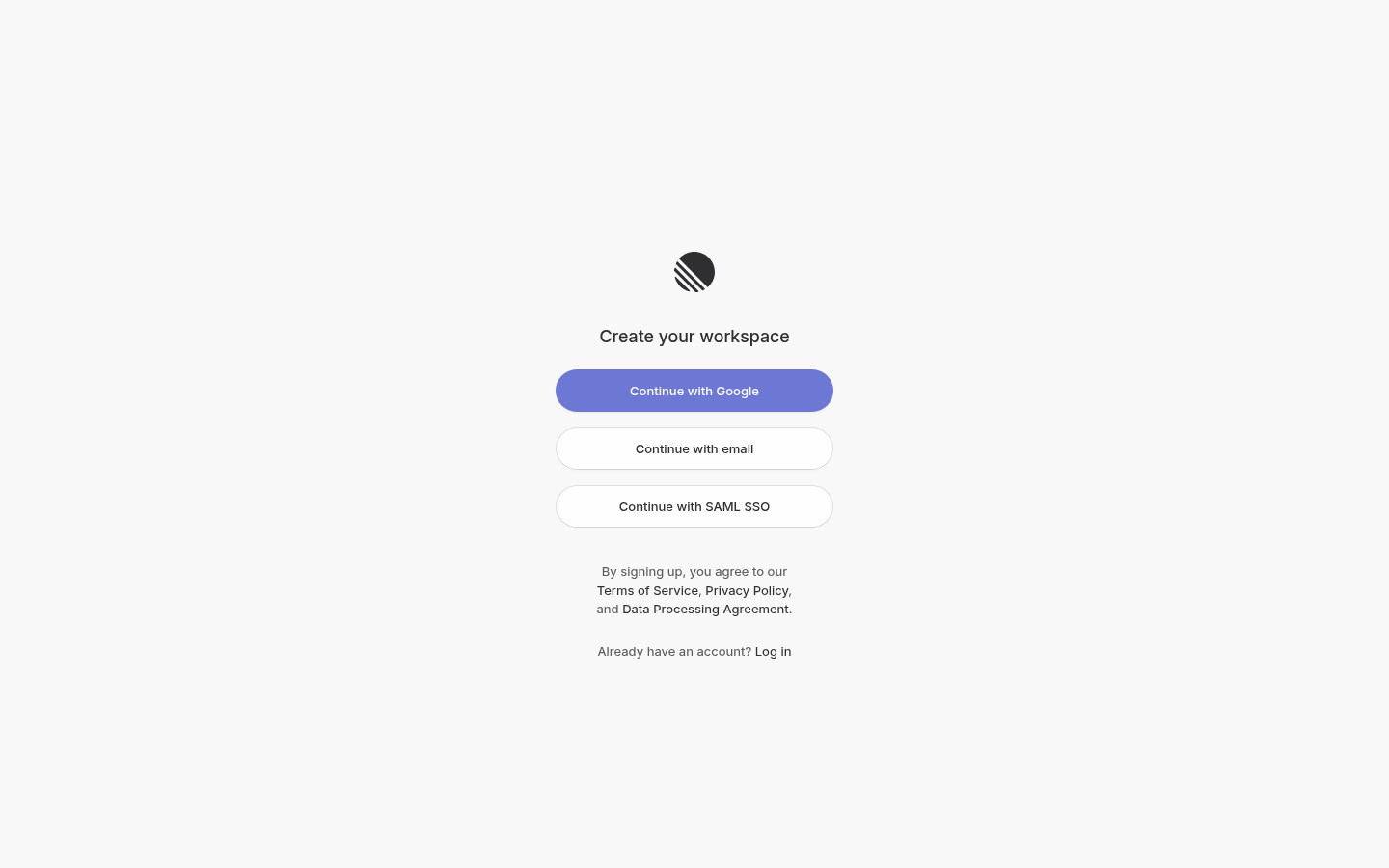
  • Centered auth card

Landing → Pricing → Sign-up entry

Captured with a headless browser. The capture stopped at the sign-up or entry page: no forms were submitted and no login walls were passed. These screenshots are fair-use reference captures; the sites, content and marks belong to their owners.

STEP 1Landinglinear.appSTEP 2Pricinglinear.app/pricingSTEP 3Sign-up entrylinear.app/signup
Mermaid source
flowchart LR
  S1["Landing"] --> S2
  S2["Pricing"] --> S3
  S3["Sign-up entry"]
Linear step 1: Landing
Step 1https://linear.app/. Captured 2026-10-22 23:13 (UTC+8) with a headless browser at 1440×900 by this library. Fair-use reference capture; content and marks © Linear, all rights reserved.
Download full resolutionScreenshots: fair-use reference captures; site content © Linear
Linear step 2: Pricing
Step 2https://linear.app/pricing. Captured 2026-10-22 23:13 (UTC+8) with a headless browser at 1440×900 by this library. Fair-use reference capture; content and marks © Linear, all rights reserved.
Download full resolutionScreenshots: fair-use reference captures; site content © Linear
Linear step 3: Sign-up entry
Step 3https://linear.app/signup. Captured 2026-10-22 23:13 (UTC+8) with a headless browser at 1440×900 by this library. Fair-use reference capture; content and marks © Linear, all rights reserved.
Download full resolutionScreenshots: fair-use reference captures; site content © Linear

Inside the product

14 screenshots captured 2026-10-22 ~23:52 (UTC+8) inside Linear with a free account. Reference captures for design research only: Linear’s UI, content and marks belong to their owner. Blanked: the account email (workspace creation screen) and the account name (assignee chip in the issue modal). Every image downloads at full resolution; all of them are in the entry’s .zip.

Onboarding flow

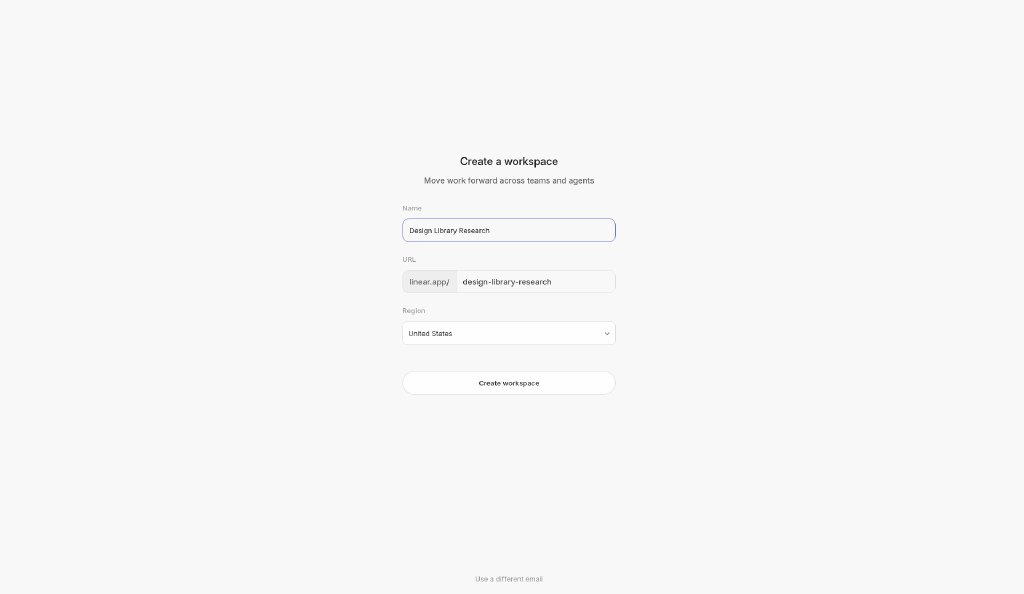
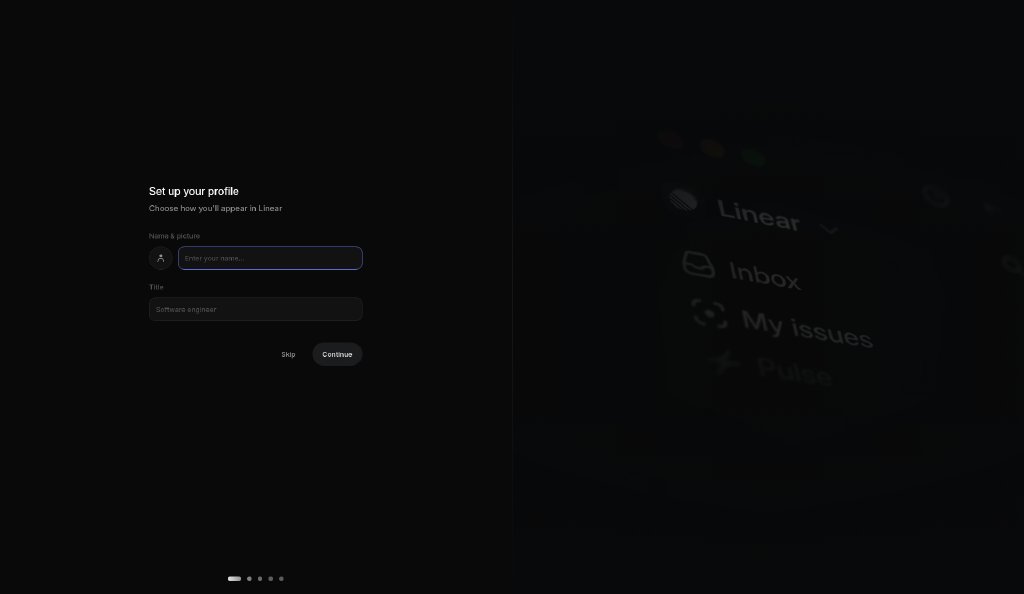
Workspace creation, five optional setup steps (every one has Skip), then the first issues view. Also listed as its own entry: FL-001 · Linear onboarding flow.

STEP 1Create workspacelinear · in-appSTEP 2Set up profilelinear · in-appSTEP 3Invite teammateslinear · in-appSTEP 4Connect GitHublinear · in-appSTEP 5Connect Slacklinear · in-appSTEP 6Subscribe to updateslinear · in-appSTEP 7Issues view (app shell)linear · in-app
Mermaid source
flowchart LR
  S1["Create workspace"] --> S2
  S2["Set up profile"] --> S3
  S3["Invite teammates"] --> S4
  S4["Connect GitHub"] --> S5
  S5["Connect Slack"] --> S6
  S6["Subscribe to updates"] --> S7
  S7["Issues view (app shell)"]
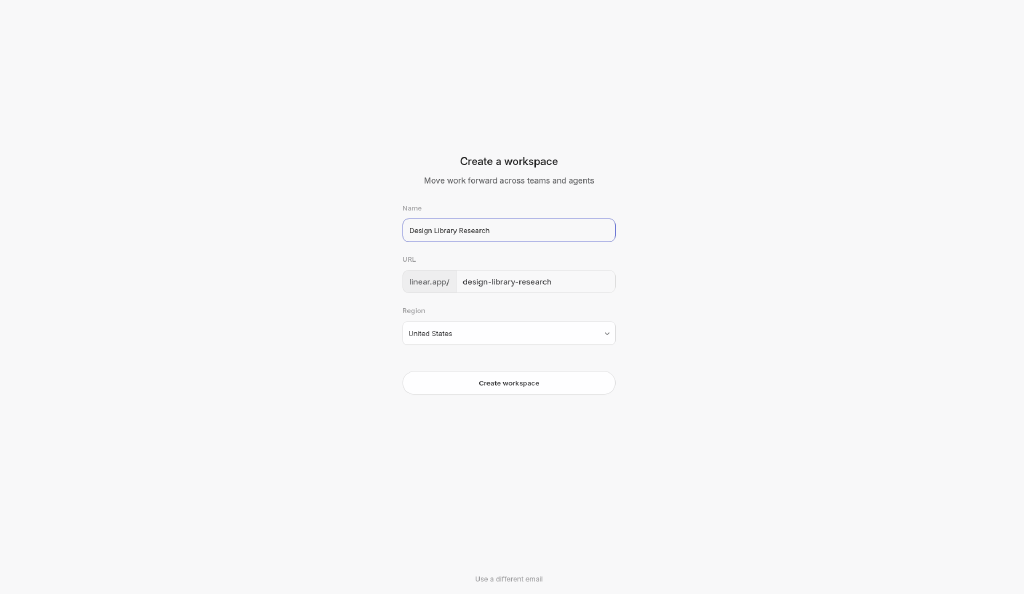
Linear onboarding step 1: Create workspace
Step 1 · Create workspace Centered single-column form on a light page: workspace name, URL slug (linear.app/…) and region, one full-width secondary button. Captured 2026-10-22 ~23:52 (UTC+8) inside Linear (linear.app) with a free account. Reference capture for design research; Linear’s UI, content and marks © Linear, all rights reserved. The account email and name are blanked out.
Download full resolutionIn-app screenshots: reference captures from a free account; UI and marks © Linear
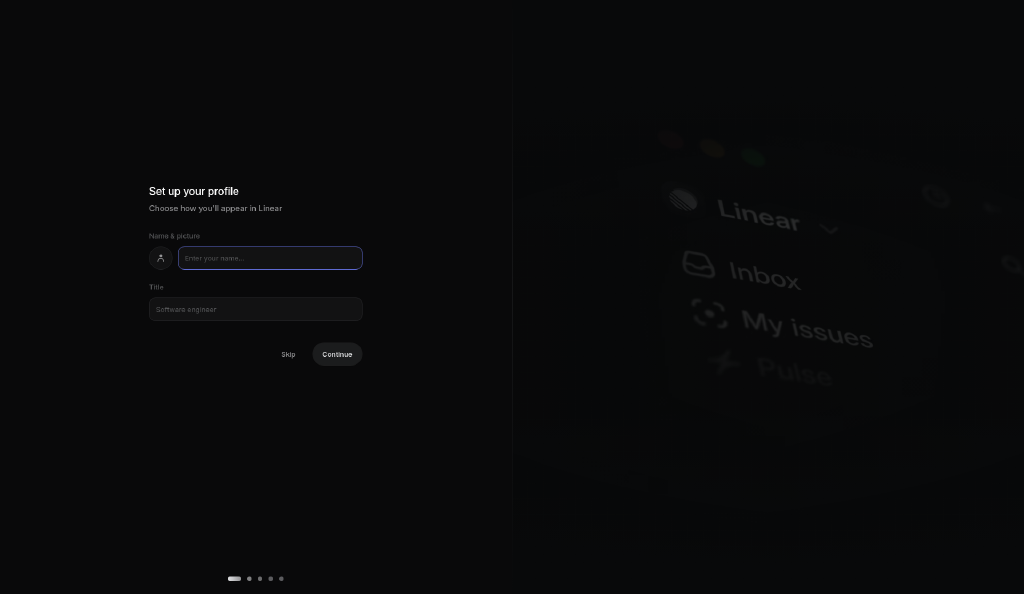
Linear onboarding step 2: Onboarding · Set up profile
Step 2 · Onboarding · Set up profile Dark split screen: compact form on the left (avatar, name, title; Skip / Continue), blurred product imagery on the right, step dots at the bottom (1 of 5). Captured 2026-10-22 ~23:52 (UTC+8) inside Linear (linear.app) with a free account. Reference capture for design research; Linear’s UI, content and marks © Linear, all rights reserved. The account email and name are blanked out.
Download full resolutionIn-app screenshots: reference captures from a free account; UI and marks © Linear
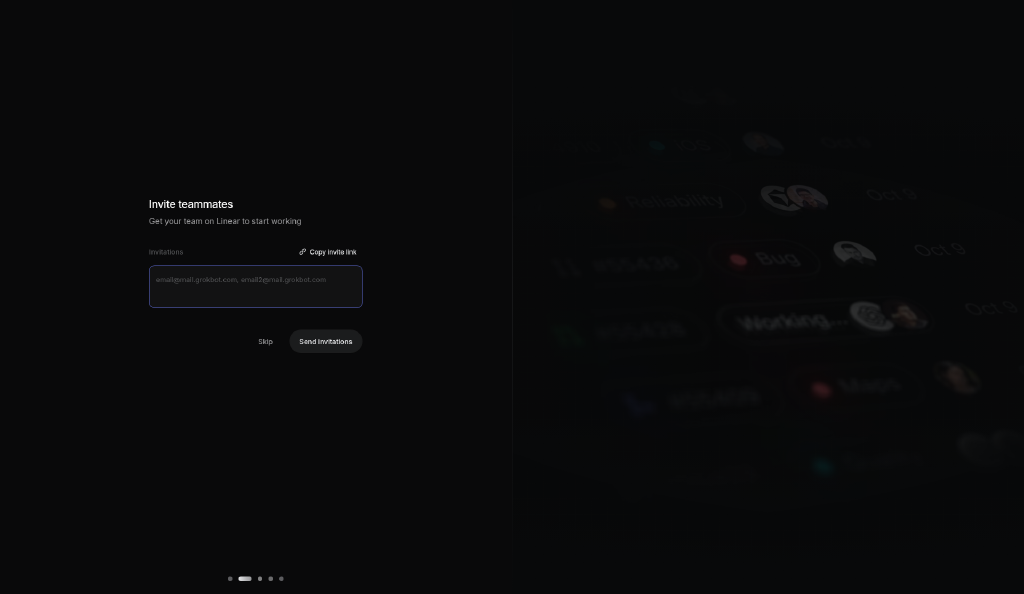
Linear onboarding step 3: Onboarding · Invite teammates
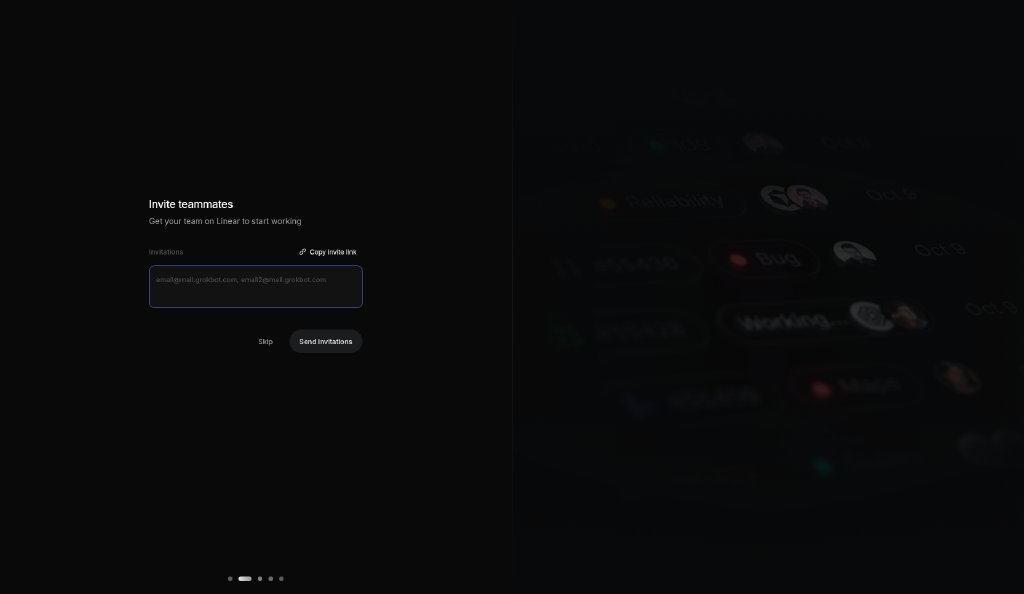
Step 3 · Onboarding · Invite teammates Same split layout: a multi-email textarea, “Copy invite link”, Skip / Send invitations (step 2 of 5). Captured 2026-10-22 ~23:52 (UTC+8) inside Linear (linear.app) with a free account. Reference capture for design research; Linear’s UI, content and marks © Linear, all rights reserved. The account email and name are blanked out.
Download full resolutionIn-app screenshots: reference captures from a free account; UI and marks © Linear
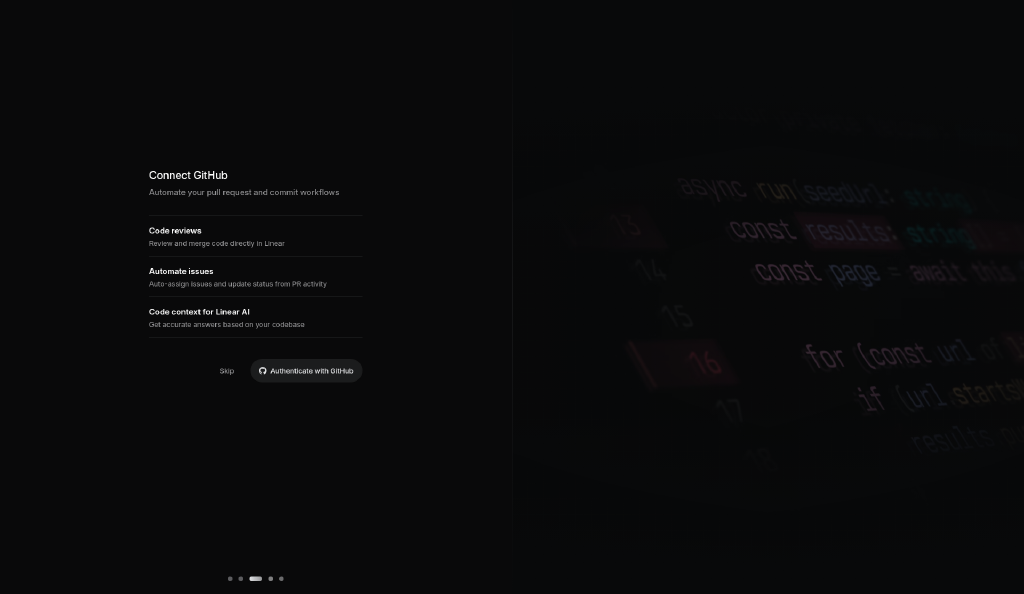
Linear onboarding step 4: Onboarding · Connect GitHub
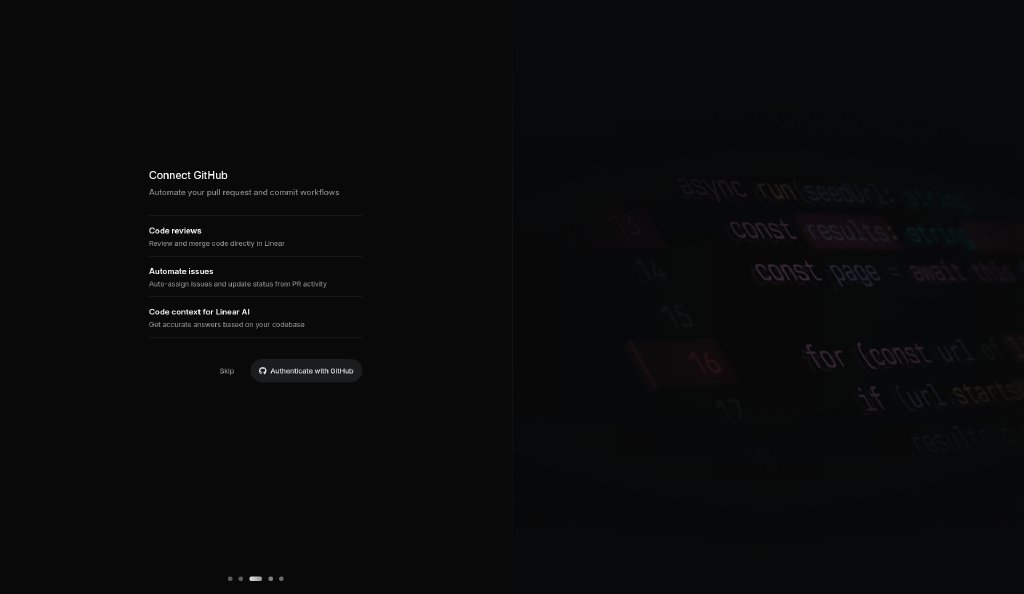
Step 4 · Onboarding · Connect GitHub Benefit list (three items) and an “Authenticate with GitHub” button next to Skip (step 3 of 5). Captured 2026-10-22 ~23:52 (UTC+8) inside Linear (linear.app) with a free account. Reference capture for design research; Linear’s UI, content and marks © Linear, all rights reserved. The account email and name are blanked out.
Download full resolutionIn-app screenshots: reference captures from a free account; UI and marks © Linear
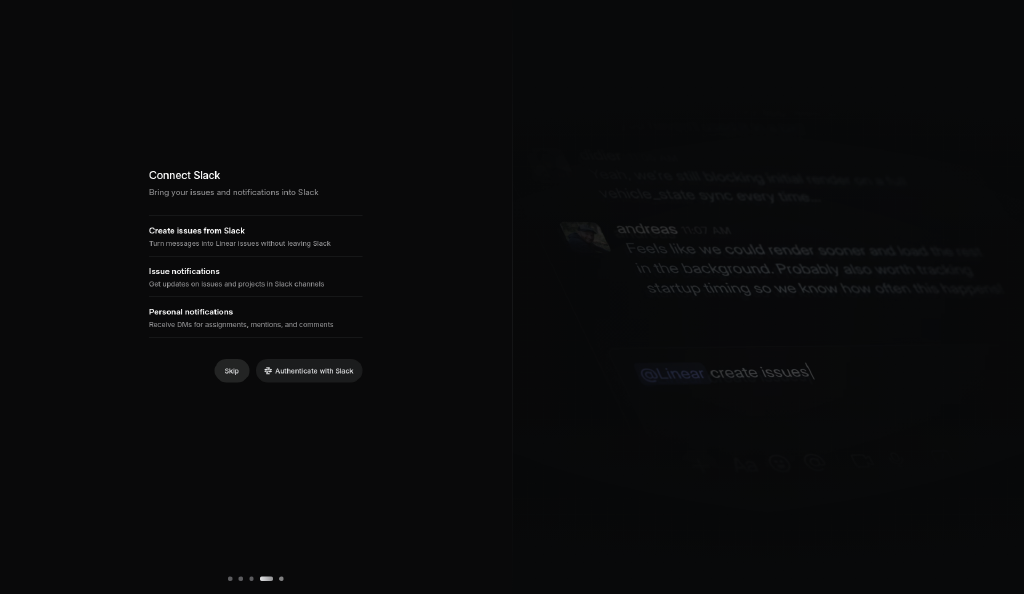
Linear onboarding step 5: Onboarding · Connect Slack
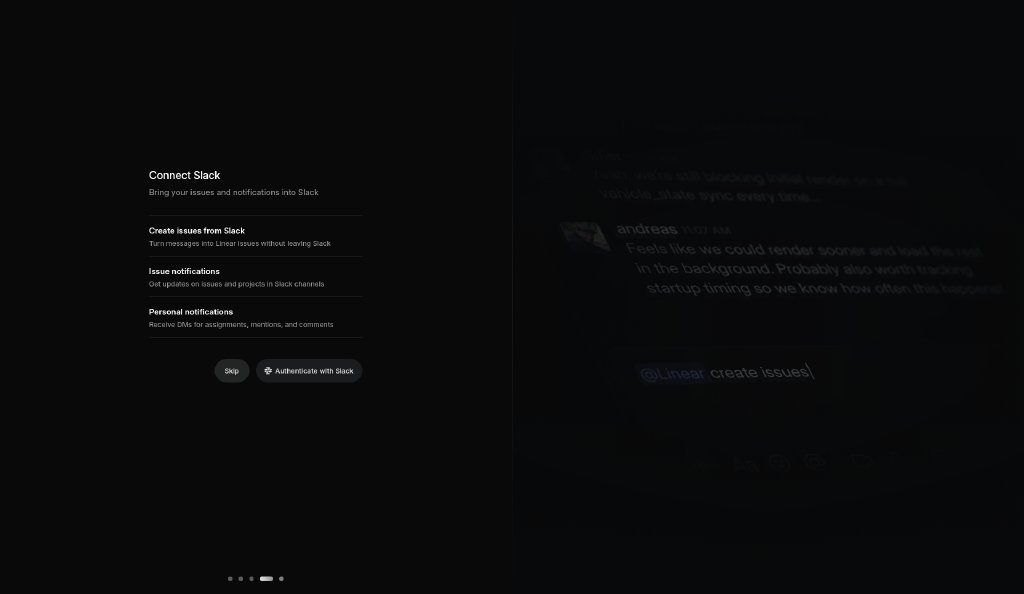
Step 5 · Onboarding · Connect Slack Three benefits for the Slack integration and “Authenticate with Slack” next to Skip (step 4 of 5). Captured 2026-10-22 ~23:52 (UTC+8) inside Linear (linear.app) with a free account. Reference capture for design research; Linear’s UI, content and marks © Linear, all rights reserved. The account email and name are blanked out.
Download full resolutionIn-app screenshots: reference captures from a free account; UI and marks © Linear
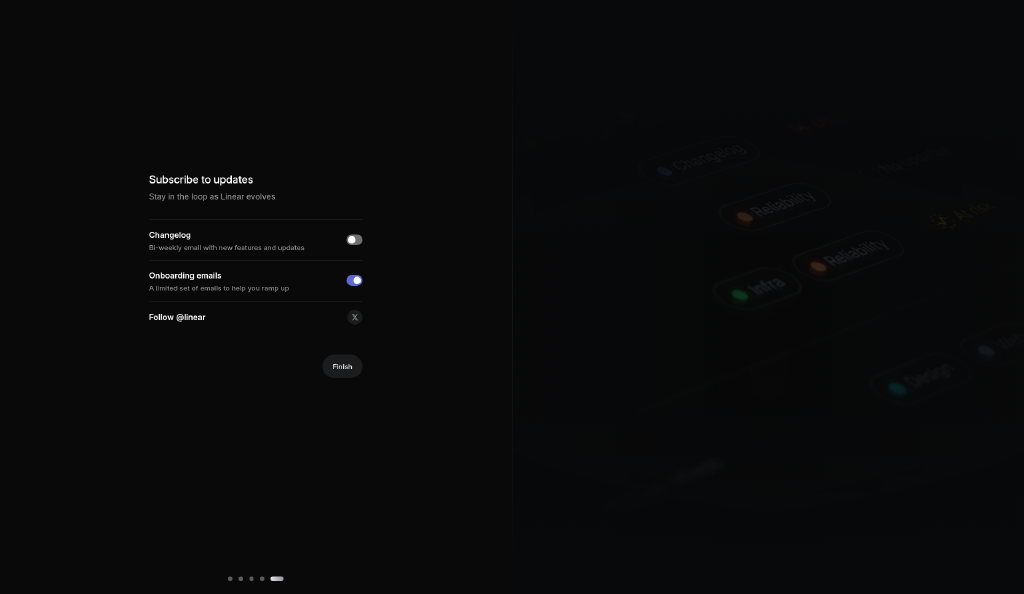
Linear onboarding step 6: Onboarding · Subscribe to updates
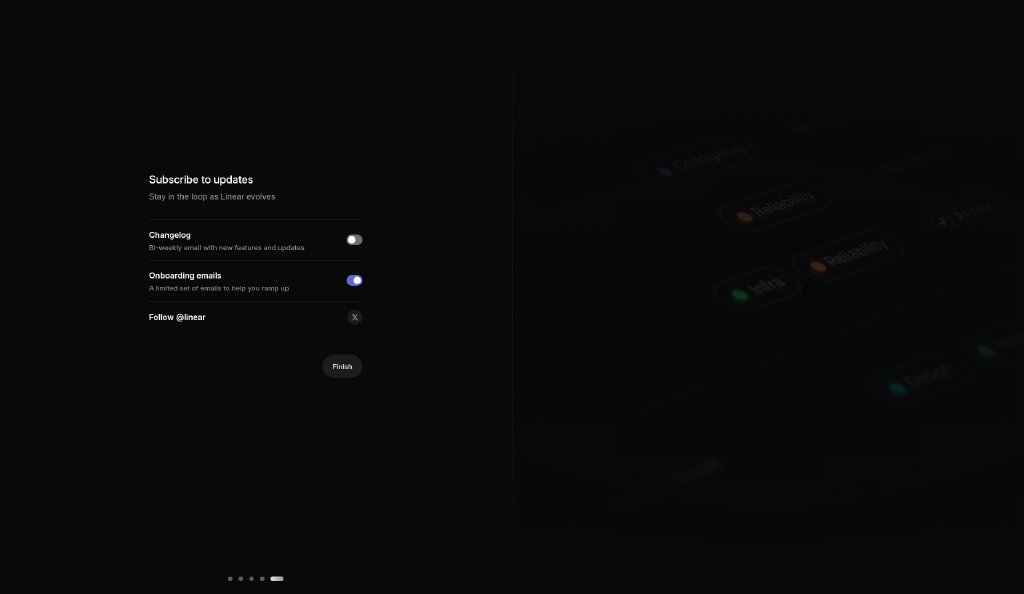
Step 6 · Onboarding · Subscribe to updates Toggle list for product updates and a final Continue (step 5 of 5). Captured 2026-10-22 ~23:52 (UTC+8) inside Linear (linear.app) with a free account. Reference capture for design research; Linear’s UI, content and marks © Linear, all rights reserved. The account email and name are blanked out.
Download full resolutionIn-app screenshots: reference captures from a free account; UI and marks © Linear
Linear onboarding step 7: Issues view (app shell)
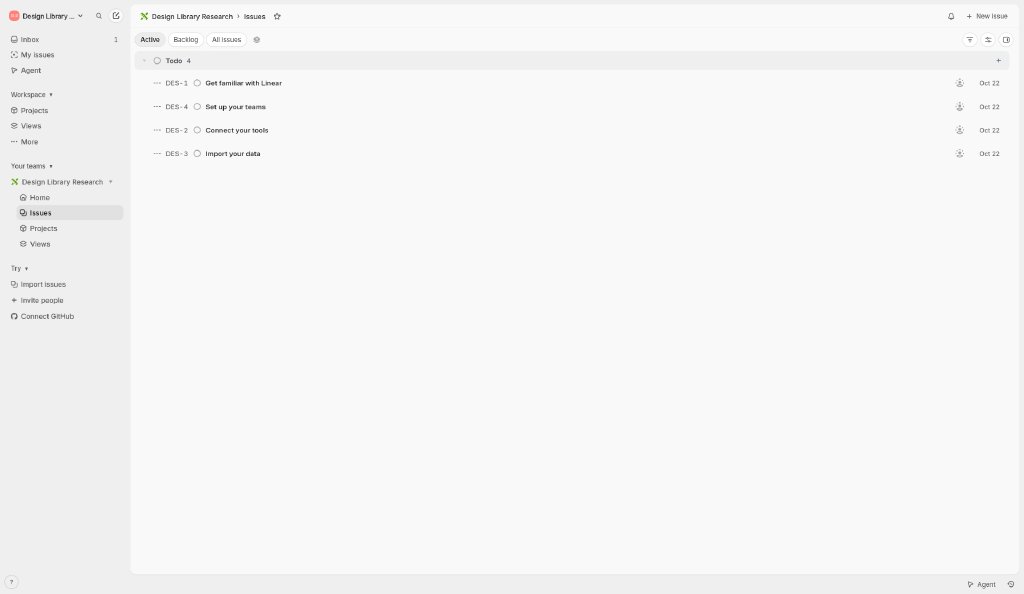
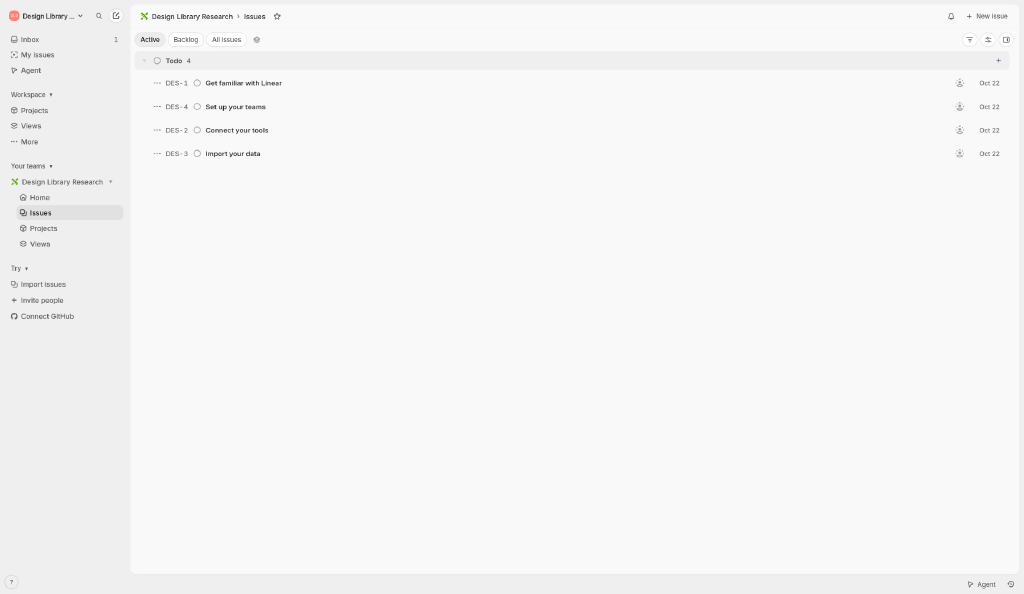
Step 7 · Issues view (app shell) Light app shell: left sidebar (Inbox, My issues, Workspace, Your teams, Try), top breadcrumb, view tabs (Active / Backlog / All issues) and a dense grouped issue list. Captured 2026-10-22 ~23:52 (UTC+8) inside Linear (linear.app) with a free account. Reference capture for design research; Linear’s UI, content and marks © Linear, all rights reserved. The account email and name are blanked out.
Download full resolutionIn-app screenshots: reference captures from a free account; UI and marks © Linear

In-app UI analysis

Our observations from these captures.

App shell layoutPersistent left sidebar (~130px of a 1024px viewport) on a slightly darker gray than the main canvas; the content area is an inset rounded panel with a header row (breadcrumb + actions) and a view-tab row. A slim bottom bar holds help and Agent shortcuts.
Sidebar navigationPersonal items first (Inbox with an unread count, My issues, Agent), then collapsible groups: Workspace, Your teams (team → Home / Issues / Projects / Views) and Try (import, invite, connect GitHub). Small 14px icons, compact rows, active row as a soft gray pill.
DensityHigh information density: ~23px issue rows in the captured list (ID, status icon, title, assignee avatar, date), small type and tight spacing; color is reserved for status and the purple primary actions.
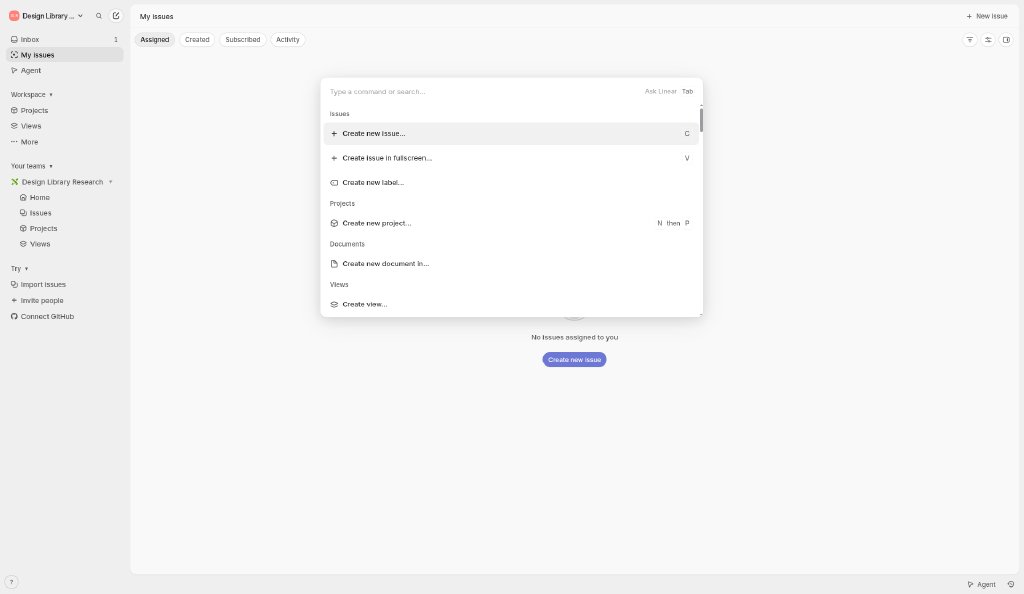
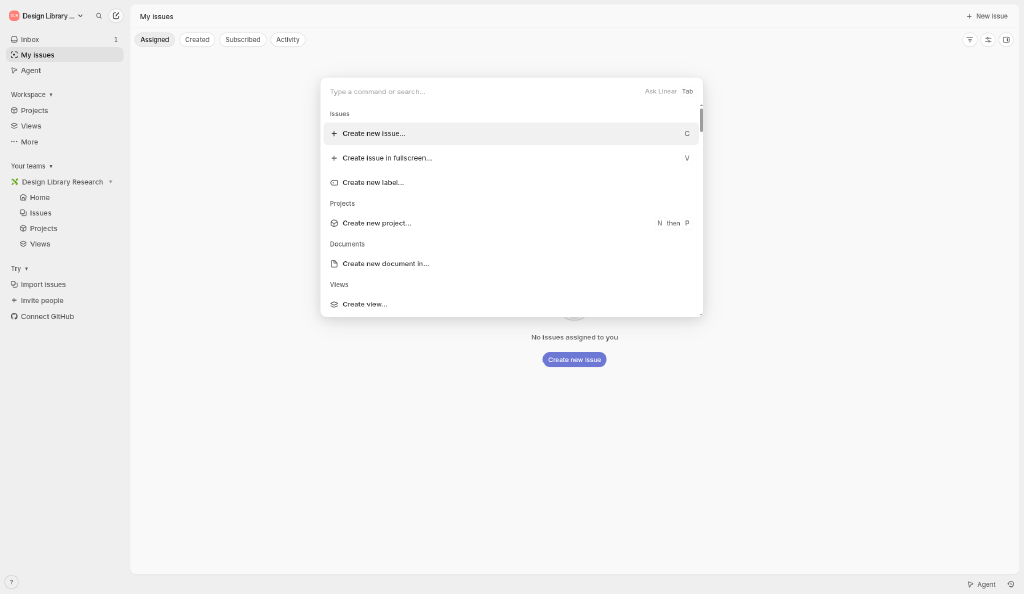
Command menu patternCtrl+K opens a centered palette over the current view: one input (“Type a command or search…”, plus “Ask Linear”), results grouped by object type, each row with an icon and its single-key or chord shortcut (C, V, N then P). It teaches shortcuts while you search.
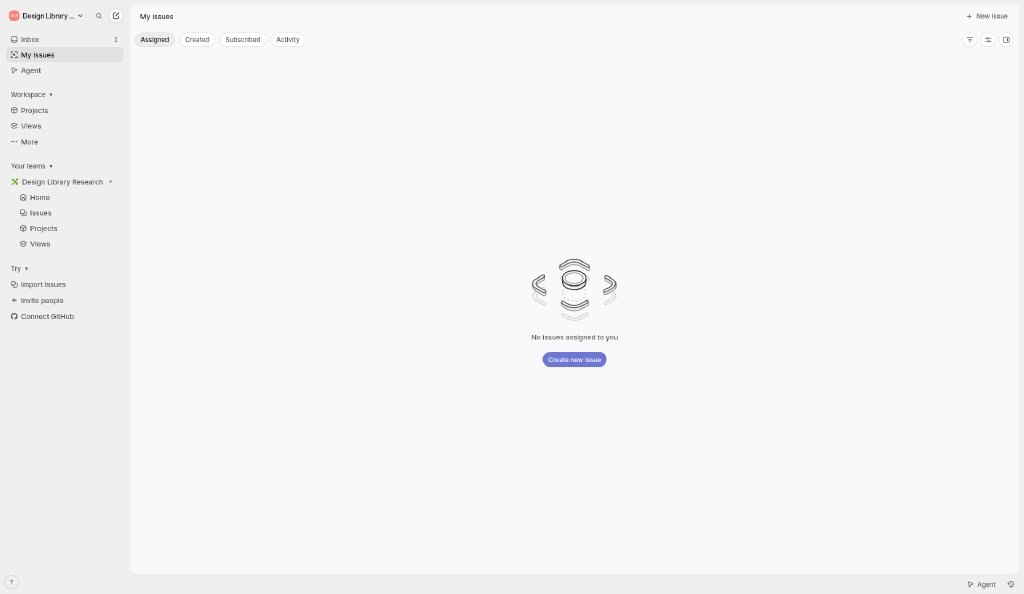
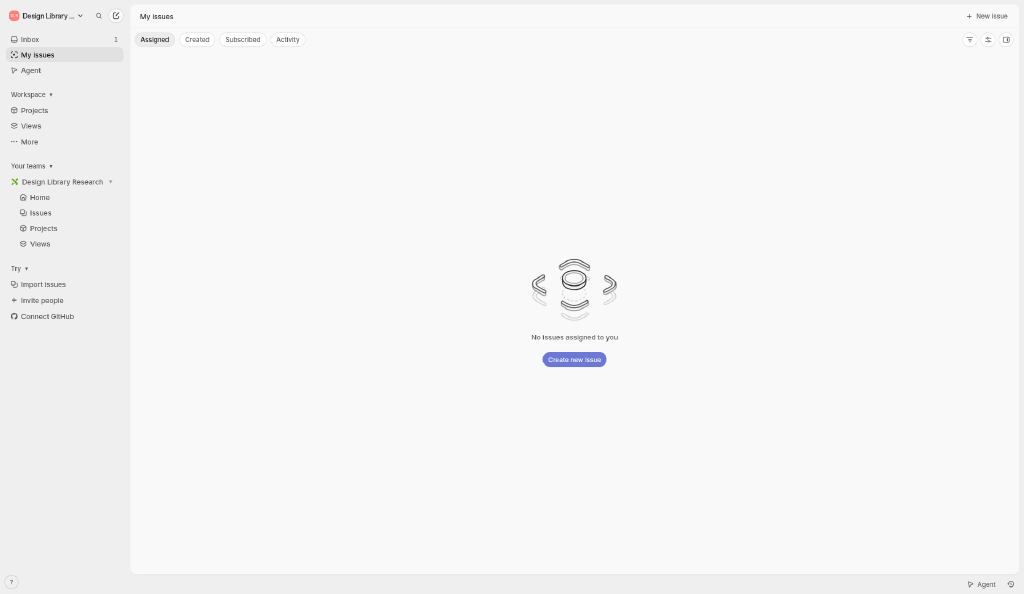
Empty state patternA monochrome line-art illustration, one sentence (“No issues assigned to you”) and a single primary CTA. Filter chips (Assigned / Created / Subscribed / Activity) stay visible, so the user keeps their bearings.
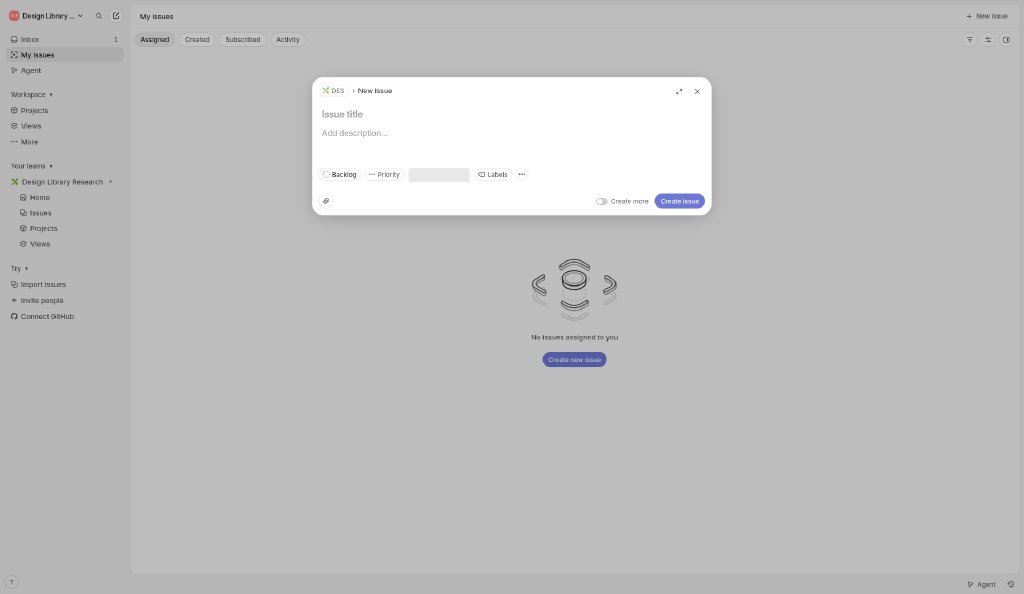
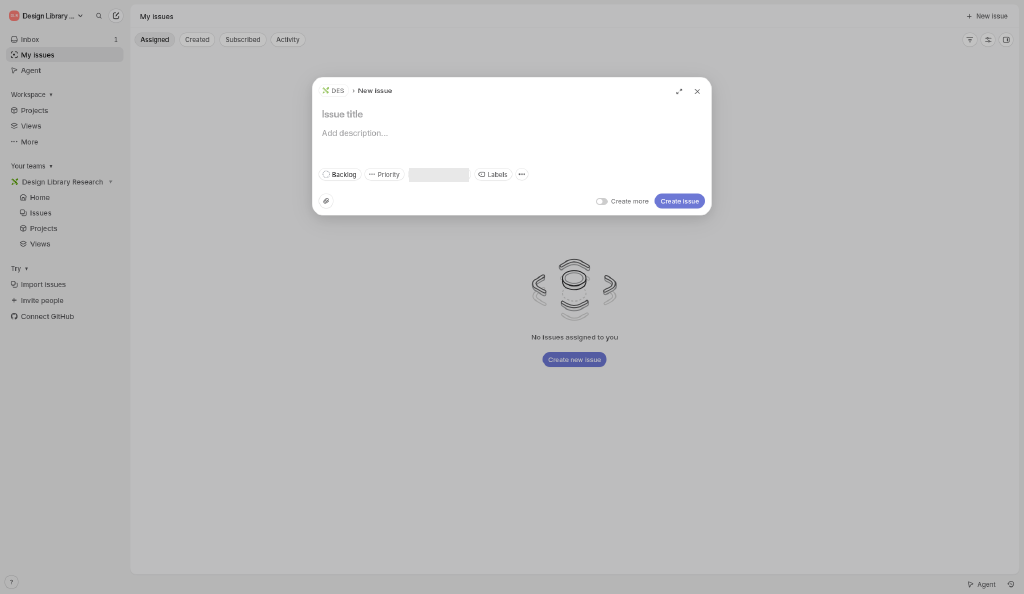
Modal patternIssue creation is a centered card over a dimmed shell: breadcrumb (team › New issue), large borderless title field, description, a row of property chips, expand and close icons, plus a “Create more” toggle for batch entry and one primary button.
Onboarding patternFive dark split-screen steps after workspace creation: a short form on the left, blurred product art on the right, progress dots, and Skip on every step; integrations (GitHub, Slack) are offered but optional.
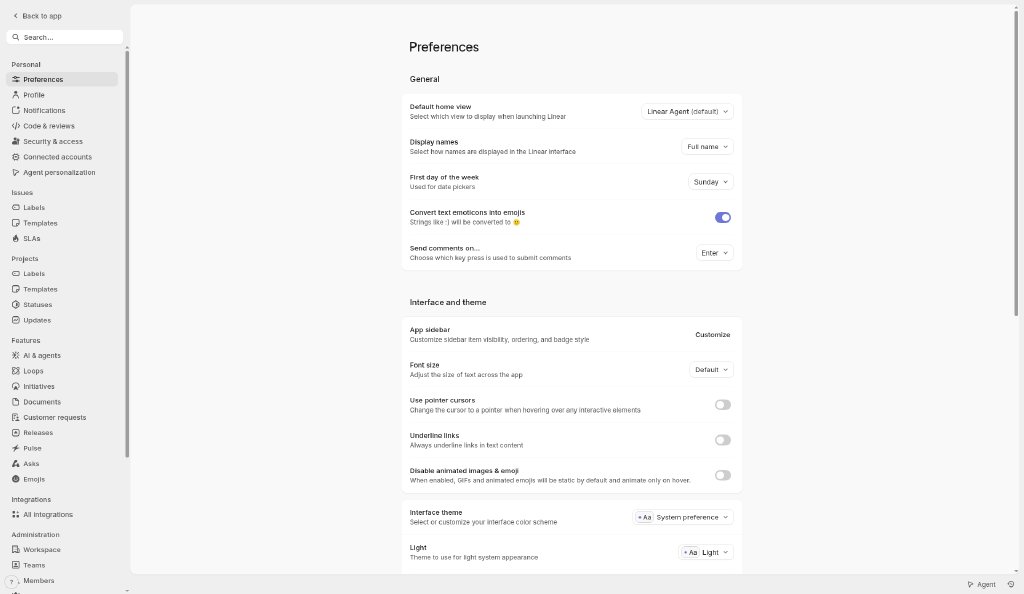
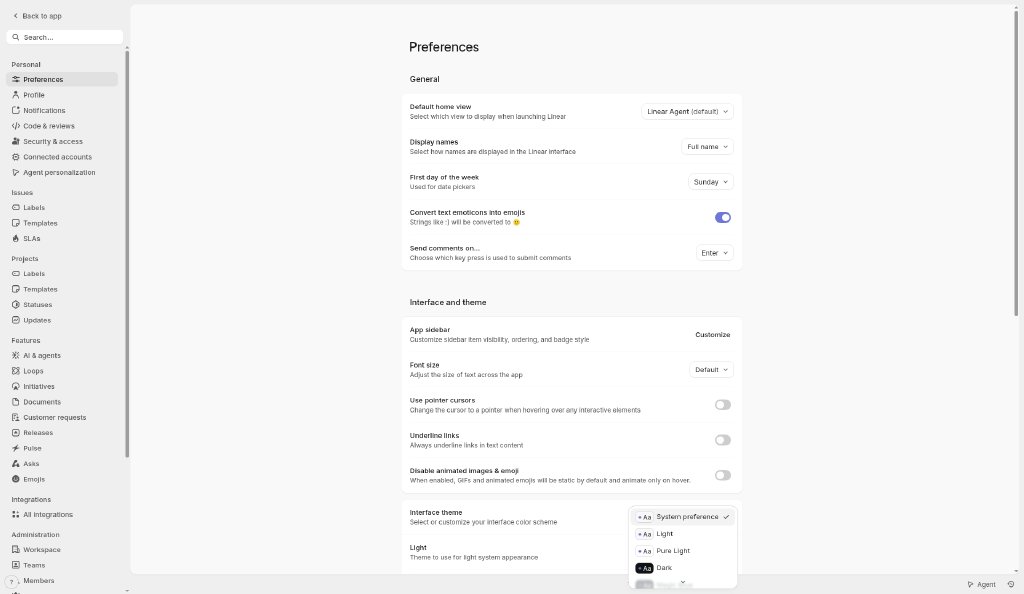
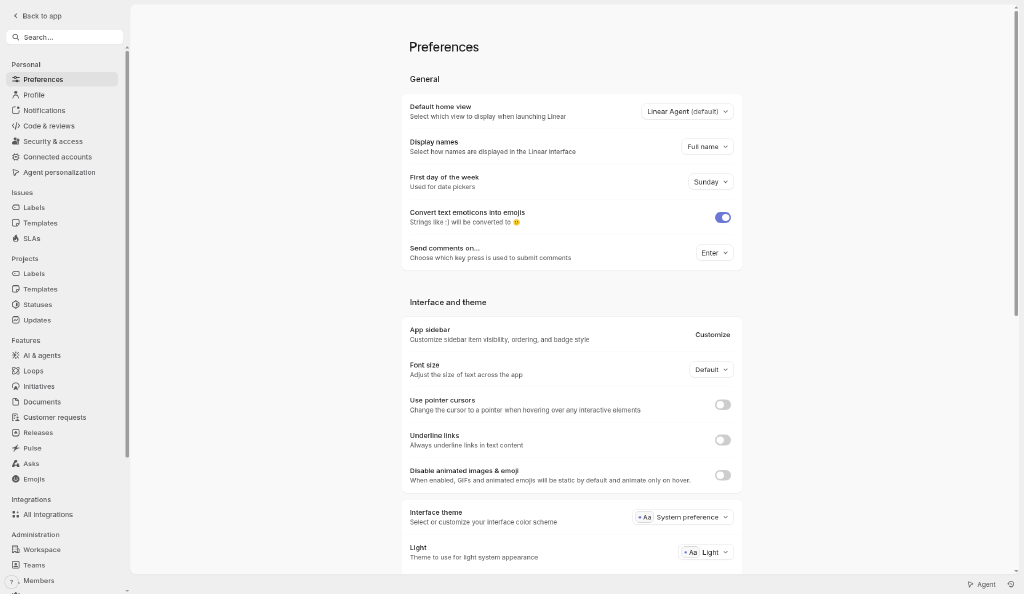
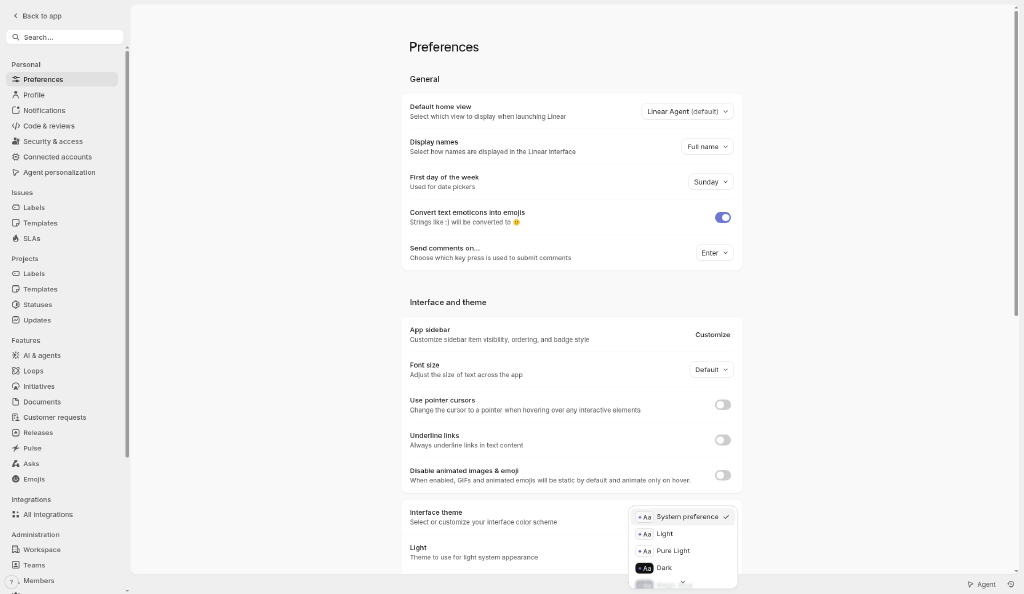
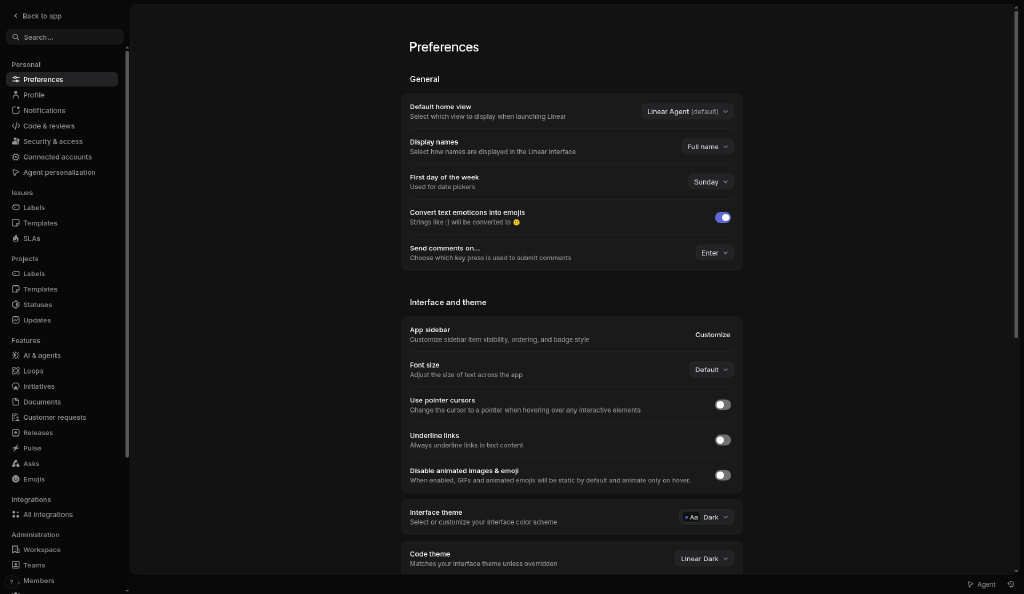
Theme systemPreferences offer System preference, Light, Pure Light, Dark and more, each previewed with an “Aa” chip; a separate Code theme follows the interface theme unless overridden. Light and dark keep identical layouts; only surfaces and text tokens swap.
ESTIMATED

In-app palette: light

Sampled by us from the light captures (most frequent color inside each named region; text colors from small anti-aliased type, so the true values are likely darker/brighter). Not official Linear tokens.

#EFEFF0Sidebar background#F9F9FAMain canvas#EFEFF0Group header row#E1E1E2Active nav item#3B3B3BPrimary text (darkest pixel of issue titles)#6D78D5Primary button (Create new issue)#6D78D5Toggle on#FFFFFFSettings card#BDBDBEModal overlay (dimmed canvas)
ESTIMATED

In-app palette: dark

Sampled from the dark-mode captures.

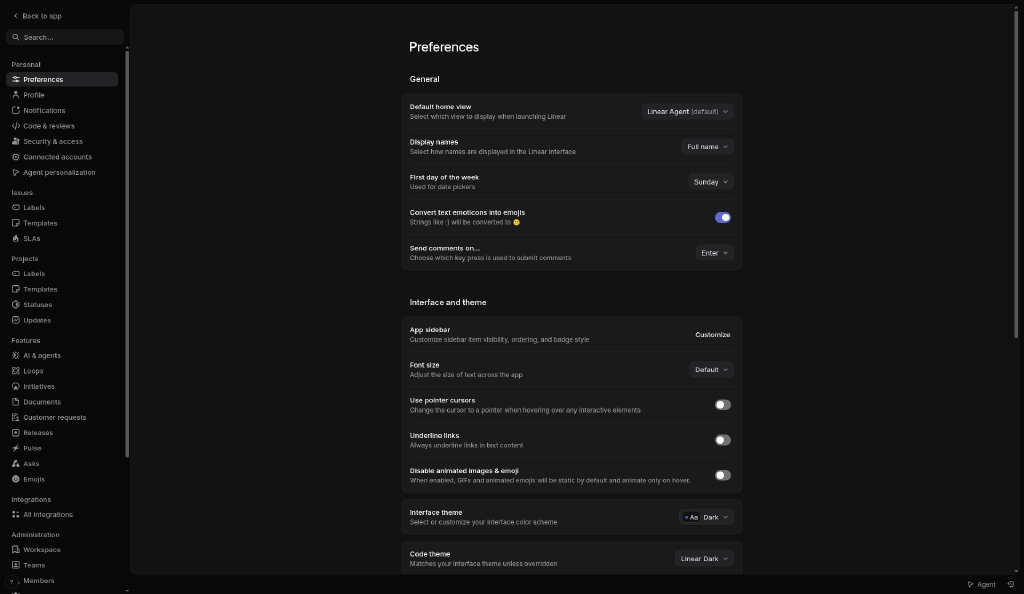
#09090AOnboarding background#121213Onboarding input#080809Settings sidebar#121213Settings canvas#1A1A1BSettings card#5E6AD2Toggle on#FFFFFFPrimary text (brightest pixel of “Preferences” heading)

Other screens

Linear: Workspace loading
Workspace loading Blank light page with a single small spinner while the workspace is created. Captured 2026-10-22 ~23:52 (UTC+8) inside Linear (linear.app) with a free account. Reference capture for design research; Linear’s UI, content and marks © Linear, all rights reserved. The account email and name are blanked out.
Download full resolutionIn-app screenshots: reference captures from a free account; UI and marks © Linear
Linear: Empty state · My issues
Empty state · My issues Centered line-art illustration, one short sentence and a single primary button (“Create new issue”). Captured 2026-10-22 ~23:52 (UTC+8) inside Linear (linear.app) with a free account. Reference capture for design research; Linear’s UI, content and marks © Linear, all rights reserved. The account email and name are blanked out.
Download full resolutionIn-app screenshots: reference captures from a free account; UI and marks © Linear
Linear: Issue create modal
Issue create modal Centered modal over a dimmed shell: breadcrumb, title and description fields, property chips (status, priority, assignee, labels), “Create more” toggle and primary “Create issue”. Captured 2026-10-22 ~23:52 (UTC+8) inside Linear (linear.app) with a free account. Reference capture for design research; Linear’s UI, content and marks © Linear, all rights reserved. The account email and name are blanked out.
Download full resolutionIn-app screenshots: reference captures from a free account; UI and marks © Linear
Linear: Command menu (Ctrl+K)
Command menu (Ctrl+K) Centered command palette: search input, grouped actions (Issues, Projects, Documents, Views) with keyboard shortcuts on the right. Captured 2026-10-22 ~23:52 (UTC+8) inside Linear (linear.app) with a free account. Reference capture for design research; Linear’s UI, content and marks © Linear, all rights reserved. The account email and name are blanked out.
Download full resolutionIn-app screenshots: reference captures from a free account; UI and marks © Linear
Linear: Settings · Preferences (light)
Settings · Preferences (light) Settings shell with its own sidebar; grouped preference cards with label, helper text and right-aligned controls (selects, toggles). Captured 2026-10-22 ~23:52 (UTC+8) inside Linear (linear.app) with a free account. Reference capture for design research; Linear’s UI, content and marks © Linear, all rights reserved. The account email and name are blanked out.
Download full resolutionIn-app screenshots: reference captures from a free account; UI and marks © Linear
Linear: Settings · Theme dropdown
Settings · Theme dropdown Interface theme menu: System preference, Light, Pure Light, Dark (and more), each with an “Aa” preview chip. Captured 2026-10-22 ~23:52 (UTC+8) inside Linear (linear.app) with a free account. Reference capture for design research; Linear’s UI, content and marks © Linear, all rights reserved. The account email and name are blanked out.
Download full resolutionIn-app screenshots: reference captures from a free account; UI and marks © Linear
Linear: Settings · Preferences (dark)
Settings · Preferences (dark) Same settings page in the Dark theme; identical layout, only surfaces and text invert. Captured 2026-10-22 ~23:52 (UTC+8) inside Linear (linear.app) with a free account. Reference capture for design research; Linear’s UI, content and marks © Linear, all rights reserved. The account email and name are blanked out.
Download full resolutionIn-app screenshots: reference captures from a free account; UI and marks © Linear

Our analysis

Captured linear.app: near-black canvas (#08090A ESTIMATED), large white headline and a product-UI render as the hero visual; pricing is a dark four-column table; sign-up is a small centered card. Accent color is almost absent.

Monochrome darkSplit heroPrecise, engineering-minimal

Downloads

PDF: research notes made for this library; third-party images inside follow the credits in their captions. Screenshots are fair-use reference captures; the sites and their content belong to their owners. License / terms of the source: Screenshots: fair-use reference captures; site content © Linear

DESIGN.md for AI coding agents

Copy this into your repo or agent context. OFFICIAL and ESTIMATED values are labelled.

# DESIGN.md · Linear (WR-001)

> Written for AI coding agents. Values marked **OFFICIAL** come from the documented source named below; values marked **ESTIMATED** were measured by us from our own screenshots and are approximate. Never treat ESTIMATED values as official brand tokens.

## Overview
- Type: Website Reference · Category: I. Website References
- Platforms: Web, macOS, iOS
- Color theme: Monochrome dark · Layout pattern: Split hero · Mood: Precise, engineering-minimal
- License / terms: Screenshots: fair-use reference captures; site content © Linear

Dark, monochrome marketing site led by large product UI renders; tiered pricing table; sign-up page with a minimal centered auth card.

### Analysis (ours)
Captured linear.app: near-black canvas (#08090A ESTIMATED), large white headline and a product-UI render as the hero visual; pricing is a dark four-column table; sign-up is a small centered card. Accent color is almost absent.

## Color tokens
No official color tokens documented for this entry.

ESTIMATED · dominant colors measured from our screenshot(s) of the source site (median-cut quantization; share = % of pixels). Approximate, not official:

- `#08090A` ~42%
- `#F8F8F9` ~32%
- `#303135` ~4%

## Typography
No official type scale documented for this entry; use the product’s own typography guidance.

## Spacing, radii, shadows
Not documented for this entry. Do not invent values; derive from your own design system.

## Components
- Top nav with CTA
- Product UI render
- Pricing table
- Centered auth card

## In-app tokens (ESTIMATED)
ESTIMATED · sampled by us from logged-in screenshots of the product (free account, 2026-10-22 ~23:52 (UTC+8)). Most frequent color inside each named UI region; approximate, not official Linear tokens.

### Light
- `#EFEFF0` Sidebar background
- `#F9F9FA` Main canvas
- `#EFEFF0` Group header row
- `#E1E1E2` Active nav item
- `#3B3B3B` Primary text (darkest pixel of issue titles)
- `#6D78D5` Primary button (Create new issue)
- `#6D78D5` Toggle on
- `#FFFFFF` Settings card
- `#BDBDBE` Modal overlay (dimmed canvas)

### Dark
- `#09090A` Onboarding background
- `#121213` Onboarding input
- `#080809` Settings sidebar
- `#121213` Settings canvas
- `#1A1A1B` Settings card
- `#5E6AD2` Toggle on
- `#FFFFFF` Primary text (brightest pixel of “Preferences” heading)

### In-app patterns (observed)
- **App shell layout:** Persistent left sidebar (~130px of a 1024px viewport) on a slightly darker gray than the main canvas; the content area is an inset rounded panel with a header row (breadcrumb + actions) and a view-tab row. A slim bottom bar holds help and Agent shortcuts.
- **Sidebar navigation:** Personal items first (Inbox with an unread count, My issues, Agent), then collapsible groups: Workspace, Your teams (team → Home / Issues / Projects / Views) and Try (import, invite, connect GitHub). Small 14px icons, compact rows, active row as a soft gray pill.
- **Density:** High information density: ~23px issue rows in the captured list (ID, status icon, title, assignee avatar, date), small type and tight spacing; color is reserved for status and the purple primary actions.
- **Command menu pattern:** Ctrl+K opens a centered palette over the current view: one input (“Type a command or search…”, plus “Ask Linear”), results grouped by object type, each row with an icon and its single-key or chord shortcut (C, V, N then P). It teaches shortcuts while you search.
- **Empty state pattern:** A monochrome line-art illustration, one sentence (“No issues assigned to you”) and a single primary CTA. Filter chips (Assigned / Created / Subscribed / Activity) stay visible, so the user keeps their bearings.
- **Modal pattern:** Issue creation is a centered card over a dimmed shell: breadcrumb (team › New issue), large borderless title field, description, a row of property chips, expand and close icons, plus a “Create more” toggle for batch entry and one primary button.
- **Onboarding pattern:** Five dark split-screen steps after workspace creation: a short form on the left, blurred product art on the right, progress dots, and Skip on every step; integrations (GitHub, Slack) are offered but optional.
- **Theme system:** Preferences offer System preference, Light, Pure Light, Dark and more, each previewed with an “Aa” chip; a separate Code theme follows the interface theme unless overridden. Light and dark keep identical layouts; only surfaces and text tokens swap.

## Layout rules
- Observed layout pattern: **Split hero** (from our captures).
- Public flow (captured, stopped before any form submission): Landing (https://linear.app/) → Pricing (https://linear.app/pricing) → Sign-up entry (https://linear.app/signup)

## Do’s and don’ts
- Do: Use a near-black canvas with high-contrast white text and at most one accent.
- Don’t: Don’t add multiple saturated accents or light-mode shadows.
- Do: follow the source’s license/terms listed above.
- Don’t: present ESTIMATED colors as official tokens.

## Sources
- https://linear.app
- Capture: https://linear.app/
- Capture: https://linear.app/pricing
- Capture: https://linear.app/signup
- Library entry: https://design-library-byt.pages.dev/entry/WR-001