Apple Human Interface Guidelines
Apple HIG: system colors (light/dark/IC RGB), Dynamic Type sizes, hit targets, contrast, tvOS grids, SF Symbols, UX lessons. Gaps: radii, shadows, spacing scale, semantic color values.
Summary
Apple HIG: system colors (light/dark/IC RGB), Dynamic Type sizes, hit targets, contrast, tvOS grids, SF Symbols, UX lessons. Gaps: radii, shadows, spacing scale, semantic color values.
What it is
An official design system: documented foundations (color, type, layout) plus components and usage guidance.
Who it’s for
Product designers and front-end engineers building apps that should feel native to the platform, or teams studying a mature system before writing their own.
Key takeaways
- Captured HIG landing is a white documentation layout with a left sidebar, a large heading and three illustrated cards per row.
- Color comes only from small product illustrations; the system relies on semantic dynamic colors instead of brand color.
- Strength: clarity and hierarchy through type size; risk: copying hard-coded system colors breaks dark mode and Increased Contrast.
Best practices to borrow
- Keep chrome neutral and let content carry color.
- Use a left nav tree, a readable center column and an on-page table of contents.
- Adopt its tokens through variables, not hard-coded values, and follow its component guidance before customizing.
Palette preview
Quick links
Figures
Extracted from the v2 research PDF. Only figures the research team rendered from open-licensed or official public values are shown; official page screenshots and third-party artwork are not published here (they are blanked in the downloadable PDF). Captions and credits are as written in the PDF.
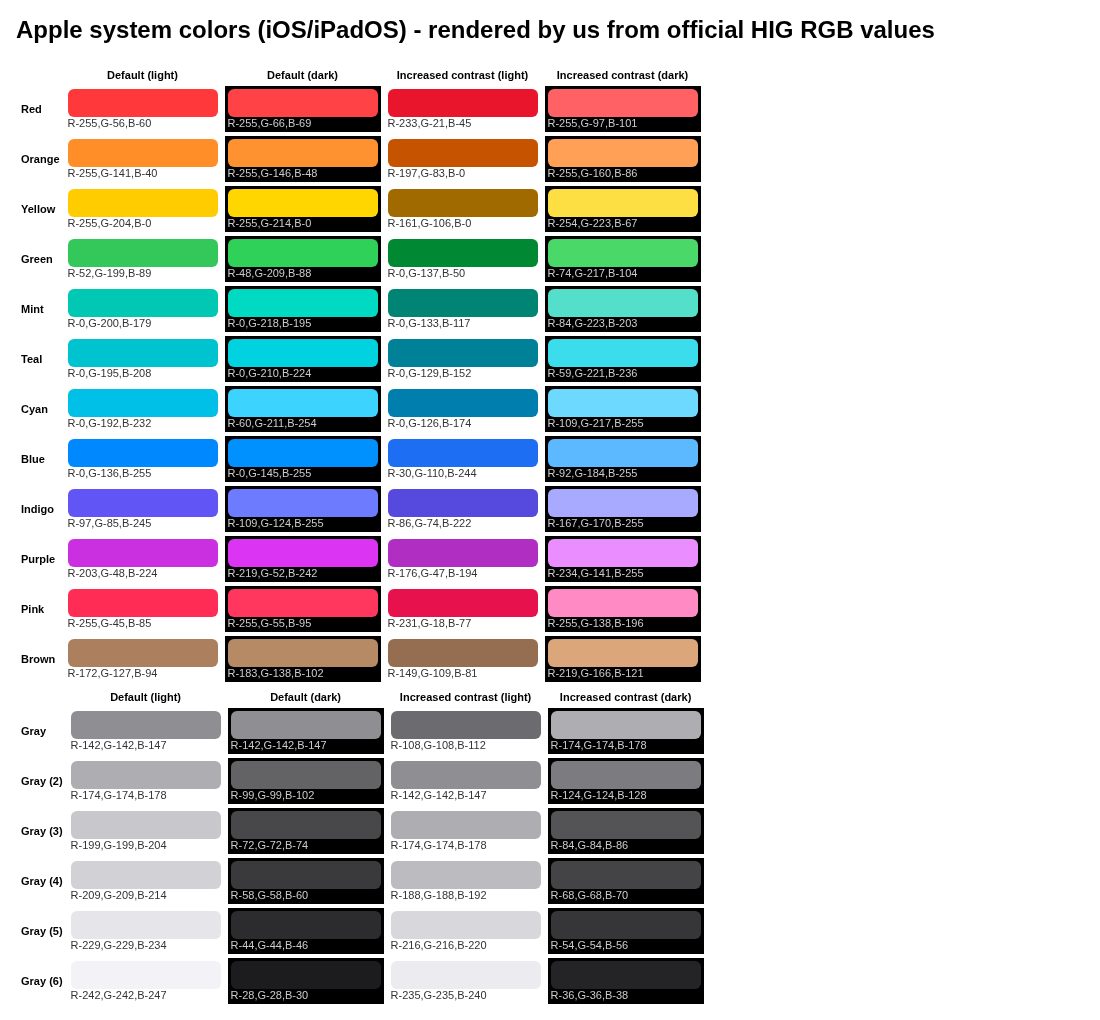
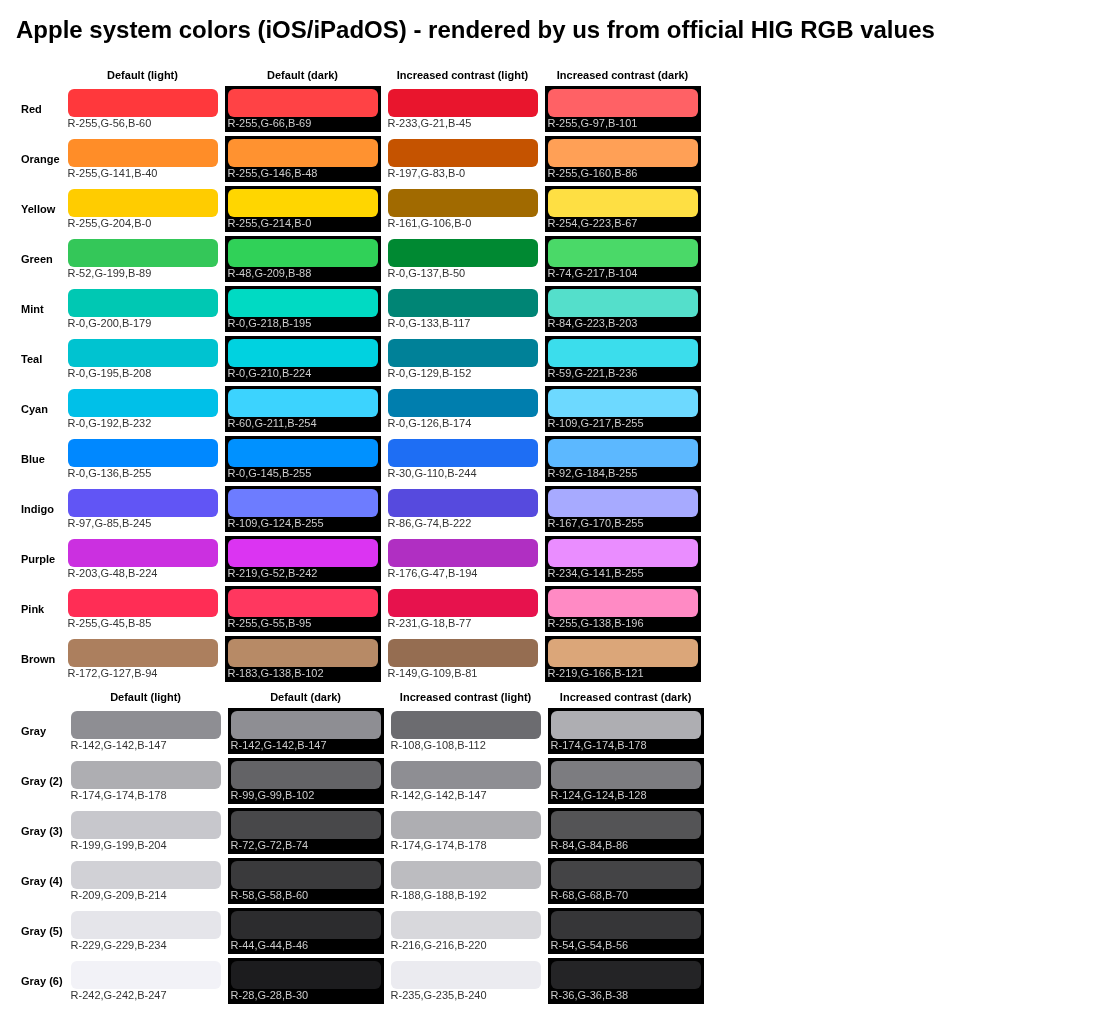
System colors, iOS/iPadOS (light / dark / increased contrast)
Extracted from the Apple-HIG-Design-System.pdf research PDF (OFFICIAL RGB values from the HIG Color page, iOS/iPadOS; HEX is an exact conversion). System colors are dynamic: use the API (e.g. UIColor.systemRed), not hard-coded values.
Swatch order: Light → Dark → IC light → IC dark
Light: #FF383CDark: #FF4245IC light: #E9152DIC dark: #FF6165Light: #FF8D28Dark: #FF9230IC light: #C55300IC dark: #FFA056Light: #FFCC00Dark: #FFD600IC light: #A16A00IC dark: #FEDF43Light: #34C759Dark: #30D158IC light: #008932IC dark: #4AD968Light: #00C8B3Dark: #00DAC3IC light: #008575IC dark: #54DFCBLight: #00C3D0Dark: #00D2E0IC light: #008198IC dark: #3BDDECLight: #00C0E8Dark: #3CD3FEIC light: #007EAEIC dark: #6DD9FFLight: #0088FFDark: #0091FFIC light: #1E6EF4IC dark: #5CB8FFLight: #6155F5Dark: #6D7CFFIC light: #564ADEIC dark: #A7AAFFLight: #CB30E0Dark: #DB34F2IC light: #B02FC2IC dark: #EA8DFFLight: #FF2D55Dark: #FF375FIC light: #E7124DIC dark: #FF8AC4Light: #AC7F5EDark: #B78A66IC light: #956D51IC dark: #DBA679Light: #8E8E93Dark: #8E8E93IC light: #6C6C70IC dark: #AEAEB2Light: #AEAEB2Dark: #636366IC light: #8E8E93IC dark: #7C7C80Light: #C7C7CCDark: #48484AIC light: #AEAEB2IC dark: #545456Light: #D1D1D6Dark: #3A3A3CIC light: #BCBCC0IC dark: #444446Light: #E5E5EADark: #2C2C2EIC light: #D8D8DCIC dark: #363638Light: #F2F2F7Dark: #1C1C1EIC light: #EBEBF0IC dark: #242426Dominant palette from our captures
Measured by us from our screenshot(s) of https://developer.apple.com/design/human-interface-guidelines/ (median-cut quantization; share = % of pixels). Approximate and not official.
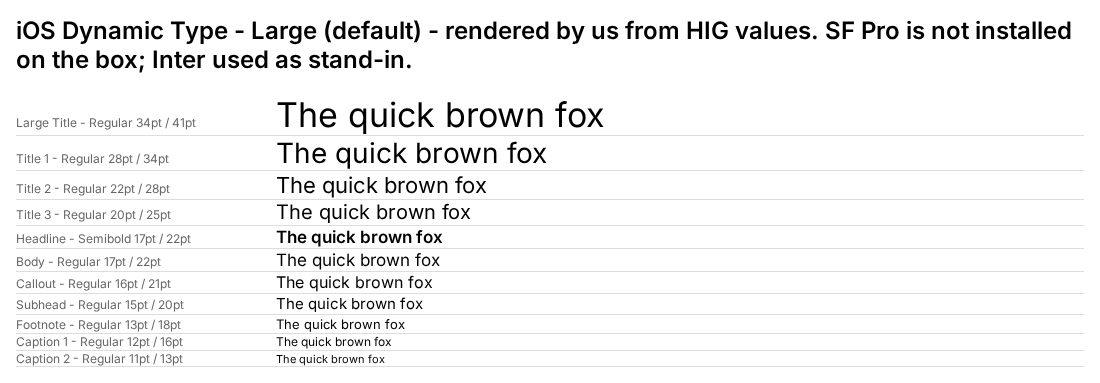
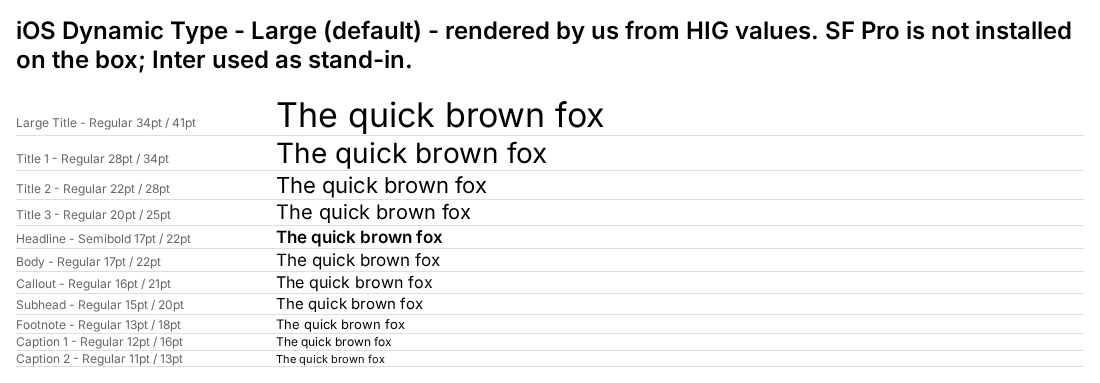
Dynamic Type sizes at default “Large” (iOS/iPadOS, points). Font: SF Pro / New York
Specimens use this site’s body font (Hanken Grotesk) at the official size and weight, as a stand-in for the system’s own typeface.
Layout pattern: Documentation
Observed by us on the captured page(s). See all entries by layout.
How to apply it: Use a left nav tree, a readable center column and an on-page table of contents.
Other entries with this layout: Spotify brand & design guidelines, Vercel brand assets (Geist), DiceBear · Lorelei, DiceBear · Notionists (Notion-style avatars), Anthropic ‘frontend-design’ skill.
Spacing, shape and other values
Gaps: Not published in HIG / not verified: semantic label & background color values, spacing scale, corner radii, shadows.
Components
Documented by the design system (from the research PDF).
- Buttons
- Toggles
- Pickers
- Segmented controls
- Sliders
- Steppers
- Text fields
- Menus
- Alerts
- Sheets
- Popovers
- Lists
- Tab bars
- Toolbars
- Navigation bars
- Sidebars
- Search fields
- Progress indicators
Our analysis
Captured HIG landing is a white documentation layout with a left sidebar, a large heading and three illustrated cards per row. Color comes only from small product illustrations; the system relies on semantic dynamic colors instead of brand color. Strength: clarity and hierarchy through type size; risk: copying hard-coded system colors breaks dark mode and Increased Contrast.
Similar to this
Ranked by shared color theme, layout, category, type and mood tags.
Downloads
PDF: research notes made for this library; third-party images inside follow the credits in their captions. License / terms of the source: Guidelines (no open license); SF fonts/Symbols under Apple license agreements
DESIGN.md for AI coding agents
Copy this into your repo or agent context. OFFICIAL and ESTIMATED values are labelled.
# DESIGN.md · Apple Human Interface Guidelines (DS-002)

> Written for AI coding agents. Values marked **OFFICIAL** come from the documented source named below; values marked **ESTIMATED** were measured by us from our own screenshots and are approximate. Never treat ESTIMATED values as official brand tokens.

## Overview
- Type: Design System · Category: C. Design Systems
- Platforms: iOS, iPadOS, macOS, watchOS, tvOS, visionOS
- Color theme: Monochrome light · Layout pattern: Documentation · Mood: Native, restrained, content-first
- License / terms: Guidelines (no open license); SF fonts/Symbols under Apple license agreements

Apple HIG: system colors (light/dark/IC RGB), Dynamic Type sizes, hit targets, contrast, tvOS grids, SF Symbols, UX lessons. Gaps: radii, shadows, spacing scale, semantic color values.

### Analysis (ours)
Captured HIG landing is a white documentation layout with a left sidebar, a large heading and three illustrated cards per row. Color comes only from small product illustrations; the system relies on semantic dynamic colors instead of brand color. Strength: clarity and hierarchy through type size; risk: copying hard-coded system colors breaks dark mode and Increased Contrast.

## Color tokens
OFFICIAL · System colors, iOS/iPadOS (light / dark / increased contrast). Extracted from the Apple-HIG-Design-System.pdf research PDF (OFFICIAL RGB values from the HIG Color page, iOS/iPadOS; HEX is an exact conversion). System colors are dynamic: use the API (e.g. UIColor.systemRed), not hard-coded values.

| Role | Light | Dark | IC light | IC dark |
|---|---|---|---|---|
| Red | `#FF383C` | `#FF4245` | `#E9152D` | `#FF6165` |
| Orange | `#FF8D28` | `#FF9230` | `#C55300` | `#FFA056` |
| Yellow | `#FFCC00` | `#FFD600` | `#A16A00` | `#FEDF43` |
| Green | `#34C759` | `#30D158` | `#008932` | `#4AD968` |
| Mint | `#00C8B3` | `#00DAC3` | `#008575` | `#54DFCB` |
| Teal | `#00C3D0` | `#00D2E0` | `#008198` | `#3BDDEC` |
| Cyan | `#00C0E8` | `#3CD3FE` | `#007EAE` | `#6DD9FF` |
| Blue | `#0088FF` | `#0091FF` | `#1E6EF4` | `#5CB8FF` |
| Indigo | `#6155F5` | `#6D7CFF` | `#564ADE` | `#A7AAFF` |
| Purple | `#CB30E0` | `#DB34F2` | `#B02FC2` | `#EA8DFF` |
| Pink | `#FF2D55` | `#FF375F` | `#E7124D` | `#FF8AC4` |
| Brown | `#AC7F5E` | `#B78A66` | `#956D51` | `#DBA679` |
| systemGray | `#8E8E93` | `#8E8E93` | `#6C6C70` | `#AEAEB2` |
| systemGray2 | `#AEAEB2` | `#636366` | `#8E8E93` | `#7C7C80` |
| systemGray3 | `#C7C7CC` | `#48484A` | `#AEAEB2` | `#545456` |
| systemGray4 | `#D1D1D6` | `#3A3A3C` | `#BCBCC0` | `#444446` |
| systemGray5 | `#E5E5EA` | `#2C2C2E` | `#D8D8DC` | `#363638` |
| systemGray6 | `#F2F2F7` | `#1C1C1E` | `#EBEBF0` | `#242426` |

ESTIMATED · dominant colors measured from our screenshot(s) of the source site (median-cut quantization; share = % of pixels). Approximate, not official:

- `#FFFFFF` ~72%
- `#61D084` ~6%
- `#7F998C` ~4%
- `#B3D37F` ~3%
- `#FDF0B3` ~0%

## Typography
OFFICIAL · Dynamic Type sizes at default “Large” (iOS/iPadOS, points). Font: SF Pro / New York

| Style | Weight | Size (pt) | Leading (pt) | Emphasized |
|---|---|---|---|---|
| Large Title | Regular | 34 | 41 | Bold |
| Title 1 | Regular | 28 | 34 | Bold |
| Title 2 | Regular | 22 | 28 | Bold |
| Title 3 | Regular | 20 | 25 | Semibold |
| Headline | Semibold | 17 | 22 | Semibold |
| Body | Regular | 17 | 22 | Semibold |
| Callout | Regular | 16 | 21 | Semibold |
| Subhead | Regular | 15 | 20 | Semibold |
| Footnote | Regular | 13 | 18 | Semibold |
| Caption 1 | Regular | 12 | 16 | Semibold |
| Caption 2 | Regular | 11 | 13 | Semibold |

## Spacing, radii, shadows
- OFFICIAL · Default / minimum text size: iOS/iPadOS 17/11 pt · macOS 13/10 · tvOS 29/23 · visionOS 17/12 · watchOS 16/12
- OFFICIAL · Hit targets (default / min): iOS/iPadOS 44×44 / 28×28 pt · macOS 28×28 / 20×20 · tvOS 66×66 / 56×56 · visionOS 60×60 / 28×28 · watchOS 44×44 / 28×28
- OFFICIAL · Contrast: Text up to 17pt ≥ 4.5:1; 18pt+ or bold ≥ 3:1
- Gaps (not documented / not verified): Not published in HIG / not verified: semantic label & background color values, spacing scale, corner radii, shadows.

## Components
- Buttons
- Toggles
- Pickers
- Segmented controls
- Sliders
- Steppers
- Text fields
- Menus
- Alerts
- Sheets
- Popovers
- Lists
- Tab bars
- Toolbars
- Navigation bars
- Sidebars
- Search fields
- Progress indicators

## Layout rules
- Observed layout pattern: **Documentation** (from our captures).

## Do’s and don’ts
- Do: Keep chrome neutral and let content (images, icons, type) carry color.
- Don’t: Don’t introduce decorative color that competes with content.
- Do: follow the source’s license/terms listed above.
- Don’t: present ESTIMATED colors as official tokens.

## Sources
- https://developer.apple.com/design/human-interface-guidelines/
- Library entry: https://design-library-byt.pages.dev/entry/DS-002